Every app you use runs on two very different kinds of database work. When you tap “buy” on an order, a database has to record that one purchase, instantly, correctly, without losing it. When a company later asks “how many orders did we get last month, broken down by city,” a database has to scan millions of those records and add them up. These are not the same job, and using one tool built for the first job to do the second job is why so many “why is this dashboard so slow” problems exist.
The two jobs have names: OLTP and OLAP. OLTP (Online Transaction Processing) handles the fast, one-record-at-a-time work of running a live system. OLAP (Online Analytical Processing) handles the slow, whole-table-at-a-time work of analyzing history. Understanding OLTP vs OLAP is one of the most useful things you can learn about how software actually stores and reads data, because it explains a pattern you’ll see in almost every serious data stack: a fast operational database paired with a separate analytical database.
This guide explains what OLAP and OLTP actually mean, how they’re built differently under the hood, when to use each, and why more teams — especially teams building AI systems — are running both side by side today.
What Is OLAP?
OLAP, or Online Analytical Processing, is a category of database system designed to answer questions that summarize large amounts of data — totals, averages, trends over time, breakdowns by category. OLAP systems are read-heavy: a single query might scan millions or billions of rows, but that query happens far less often than the constant stream of small writes hitting an OLTP system.
By contrast, OLTP, or Online Transaction Processing, is the category of database system designed to record and retrieve individual transactions quickly and reliably — a new order, a login, a payment, an inventory update. OLTP systems are write-heavy and row-oriented: they’re built to touch one record (or a small handful) at a time, as fast as possible, without corrupting data even if two things happen at once.
Postgres, MySQL, and Oracle Database are classic OLTP systems. ClickHouse, Snowflake, BigQuery, and Amazon Redshift are classic OLAP systems. Most real products use both — an OLTP database to run the application, and an OLAP database to analyze what happened in it.
Why Does It Matter?
The OLTP vs OLAP distinction matters because using the wrong tool for the job creates real, measurable problems. Running analytical queries directly against a production OLTP database can slow down or lock the very system customers are actively using to check out, log in, or submit data. Running transactional workloads against an OLAP database, on the other hand, is often technically impossible or extremely inefficient, because these systems aren’t built to safely handle thousands of tiny concurrent writes.
For a business, getting this wrong shows up as slow dashboards, timeouts during checkout, or an engineering team afraid to run a report because “last time it took down the site.” Getting it right — separating transactional and analytical workloads — is one of the most impactful architecture decisions a growing product can make, and it directly affects both product reliability and the quality of the business decisions made from that data.
Why Now?
OLTP and OLAP have existed as concepts since the 1990s, so why does this distinction matter more today than it did five years ago? Two things changed.
First, the volume of data most companies now generate has grown far past what a single general-purpose database can comfortably analyze alongside serving live traffic. Second, AI systems have added an entirely new kind of demand: AI agents and applications increasingly need both fast transactional reads and writes (to log actions, store state) and fast analytical reads (to search, summarize, and reason over historical data) — often in the same product, sometimes in the same request.
This is exactly the pressure behind a July 2026 ClickHouse blog post arguing that AI-era data stacks need a “best-of-breed” pairing of an OLTP database like Postgres with an OLAP database like ClickHouse, rather than trying to force one database to do both jobs. That pairing pattern — one system of record, one system of analysis — is becoming close to a default architecture for any team building serious AI or data products in 2026, which is why understanding OLTP vs OLAP has shifted from “nice to know” to a genuinely practical, resume-relevant skill.
How It Works
The clearest way to see the difference is to trace what happens to a single order.
- A customer places an order. An OLTP database inserts one new row into an
orderstable and updates one row in aninventorytable — two small, fast writes, wrapped in a transaction so both succeed or both fail together. - That order eventually needs to show up in an analytics dashboard. A pipeline copies (or streams) the row into an OLAP system, often transformed into a different shape optimized for analysis.
- An analyst asks: “What were total sales by region last quarter?” The OLAP system scans millions of order rows, but only reads the
regionandamountcolumns — it never needs to touch customer names, shipping addresses, or the dozens of other columns in the original table.
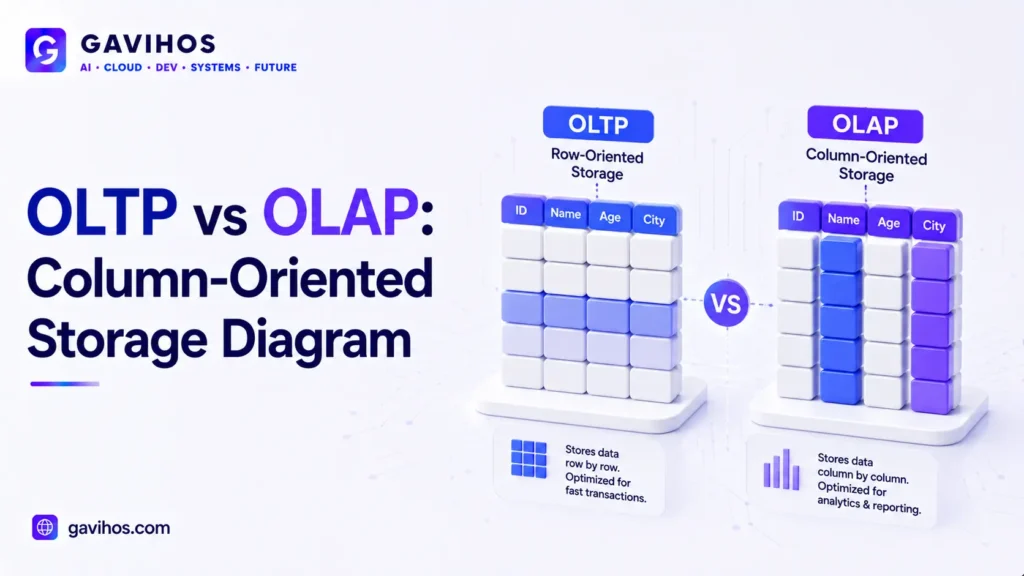
That last step is the key to why OLAP systems are fast at their job: they store data column-by-column instead of row-by-row, so a query that only needs two columns out of fifty doesn’t have to read the other forty-eight.
Architecture / Components
| Aspect | OLTP | OLAP |
|---|---|---|
| Primary goal | Record individual transactions accurately | Summarize large volumes of historical data |
| Storage layout | Row-oriented (each full row stored together) | Column-oriented (each column stored together) |
| Typical query | “Get order #48213” | “Total revenue by region, last 12 months” |
| Query pattern | Many small reads/writes, low latency | Few large reads, high throughput |
| Data freshness | Real-time, current state | Often near-real-time or batch-loaded |
| Concurrency needs | High — many simultaneous transactions | Lower — fewer, heavier queries |
| Example systems | PostgreSQL, MySQL, Oracle | ClickHouse, Snowflake, BigQuery, Redshift |
Core workflow: an OLTP database acts as the system of record for live application state. A separate ingestion layer (a change-data-capture pipeline, a streaming tool, or a scheduled batch job) moves that data into the OLAP system, often reshaping it (denormalizing tables, pre-aggregating values) to make analytical queries fast.
Real World Use Cases
- E-commerce checkout and sales reporting. Postgres records every order as it happens; a separate OLAP warehouse powers the “sales by product, by region, by week” dashboards the business team relies on daily.
- Banking and fraud analysis. A bank’s core ledger runs on an OLTP system that must never lose a transaction; a fraud-detection team runs pattern analysis across years of transactions in an OLAP system, without risking the live ledger.
- SaaS product analytics. Application state (users, subscriptions, permissions) lives in an OLTP database; product usage events feed an OLAP system that powers retention and engagement dashboards.
- AI agent memory and reasoning. An AI agent logs its actions and state transactionally, then queries an OLAP or embedded analytical engine to search and summarize its own history efficiently.
- Ad tech and real-time bidding analytics. Bid requests and impressions are recorded transactionally at high volume, while OLAP systems crunch aggregate performance metrics across billions of events to optimize campaigns.
Benefits
- OLTP systems give applications strong consistency guarantees, so financial and operational data stays accurate under heavy concurrent load.
- OLAP systems make it practical to query billions of rows in seconds, something an OLTP database would struggle to do without slowing down live traffic.
- Separating the two lets each system be tuned for what it’s actually good at, instead of compromising both.
- The pattern scales cleanly: as either transactional or analytical load grows, you scale that specific system independently.
Limitations
- Running two systems means more infrastructure to operate, monitor, and pay for.
- Data in the OLAP system is rarely instantly fresh — there’s usually a sync delay measured in seconds to hours, depending on the pipeline.
- Keeping schemas and data consistent across both systems adds real engineering overhead, especially as the application evolves.
- For small applications with modest data volumes, running a second analytical system can be unnecessary complexity — a single well-indexed OLTP database is often enough.
Engineering Tradeoffs
Adopting a separate OLTP/OLAP architecture improves query performance and protects production stability, but it introduces new complexity: you now need a reliable data pipeline, a strategy for handling sync delays, and a plan for what happens when the two systems briefly disagree. Operational costs increase — more infrastructure, more monitoring, more failure modes to reason about.
This approach should not be used by every project. A small internal tool with a few thousand rows and infrequent reporting needs gets little benefit from a dedicated OLAP system and a real cost in added complexity. The pairing earns its keep once transactional volume, analytical query complexity, or both, grow large enough that a single database can no longer serve both needs without visible tradeoffs.
Best Practices
- Keep your OLTP database focused on operational queries only; move reporting and analytics workloads out.
- Choose a data pipeline (CDC tools, streaming platforms, or scheduled ETL) that matches how fresh your analytics actually need to be — don’t over-engineer real-time sync if daily batch is enough.
- Design your OLAP schema for the questions you’ll actually ask, not a mirror of your OLTP schema.
- Monitor pipeline lag so stale data doesn’t quietly mislead business decisions.
Common Mistakes
- Running heavy analytical queries directly against a production OLTP database and being surprised when it slows down checkout.
- Assuming OLAP systems can safely handle the same volume of small, concurrent writes as an OLTP system.
- Copying the OLTP schema into the OLAP system unchanged, instead of restructuring it for analytical access patterns.
- Ignoring pipeline monitoring, so a broken sync job goes unnoticed until a report looks wrong.
What Most People Get Wrong
A common misconception is that OLAP databases are simply “the same as a regular database, just bigger.” In reality, the difference is architectural, not just about scale — row-oriented and column-oriented storage are fundamentally different designs optimized for opposite access patterns. Another myth is that adding an OLAP system is only for large enterprises; in practice, teams reach for this pattern earlier than expected once reporting queries start competing with production traffic for resources. Finally, some assume real-time analytics requires real-time OLAP replication everywhere — for most businesses, a sync delay of minutes is completely invisible to the people reading the dashboard.
Future Outlook
The line between OLTP and OLAP is starting to blur at the edges. Newer “HTAP” (Hybrid Transactional/Analytical Processing) systems attempt to serve both workloads from one engine, and embedded OLAP engines are emerging that let applications run fast analytical queries locally without a separate server round-trip — useful for AI agents that need to reason over data quickly. Even so, the underlying OLTP vs OLAP distinction remains the right mental model for understanding why these hybrid approaches exist and what tradeoffs they’re trying to solve.
FAQ
1. What does OLAP stand for? OLAP stands for Online Analytical Processing — database systems built to analyze large volumes of historical data.
2. What does OLTP stand for? OLTP stands for Online Transaction Processing — database systems built to record and retrieve individual transactions quickly.
3. What is the main difference between OLTP and OLAP? OLTP is optimized for fast, small, frequent reads and writes on individual records. OLAP is optimized for scanning and summarizing large volumes of data across many records.
4. Can I use one database for both OLTP and OLAP? Technically yes for small workloads, but as data volume and query complexity grow, using a single system for both usually causes performance problems on one side or the other.
5. Is PostgreSQL OLTP or OLAP? PostgreSQL is primarily an OLTP database, optimized for row-based transactional workloads, though extensions and configurations exist to support some analytical use cases.
6. Is Snowflake OLAP or OLTP? Snowflake is an OLAP system, built for large-scale analytical queries rather than high-frequency transactional writes.
7. Why do companies pair Postgres with ClickHouse? Postgres handles transactional application data reliably, while ClickHouse handles fast analytical queries over that same data at scale — pairing both avoids compromising either workload.
8. Do small applications need a separate OLAP database? Not necessarily. If data volume and reporting needs are modest, a well-indexed OLTP database alone is often sufficient.
9. What is column-oriented storage and why does it matter for OLAP? Column-oriented storage keeps each column’s data together on disk, so analytical queries that only need a few columns out of many can skip reading the rest — making large scans much faster.
10. How fresh is data in an OLAP system compared to OLTP? It depends on the pipeline. Some setups sync in near real time; others batch-load hourly or daily. OLAP data is rarely as instantly current as the OLTP system it’s sourced from.
Analyst Perspective
The most important takeaway isn’t that OLAP is “better” or “newer” than OLTP — it’s that the two solve opposite problems, and the real skill is recognizing which problem you’re solving before choosing a database. The hidden implication of the current AI-driven push toward pairing OLTP and OLAP systems is that data architecture decisions are moving earlier in a product’s lifecycle. Teams building AI agents can no longer treat analytics as an afterthought bolted on once the app is popular — agents themselves increasingly generate and consume analytical queries as part of normal operation, not just for quarterly business reviews.
A second-order effect worth watching: as embedded, in-process OLAP engines mature, the cost of adding an analytical layer drops sharply, which means the “should we bother with a separate OLAP system” threshold will keep moving earlier for smaller teams. Developers should pay attention to how their data pipelines handle failure and lag, since that’s where most real-world OLTP/OLAP setups quietly break. Businesses should watch whether their reporting depends on data that’s minutes, hours, or days stale — and whether that’s actually acceptable for the decisions being made from it.
Key Takeaways
- OLTP handles fast, individual transactions; OLAP handles large-scale analytical queries.
- The two are built on fundamentally different storage architectures — row-oriented vs. column-oriented.
- Most serious products pair a dedicated OLTP database with a dedicated OLAP system rather than forcing one tool to do both jobs.
- AI-era workloads are accelerating adoption of this pairing, since agents need both fast transactional state and fast analytical reasoning.
- Don’t add OLAP infrastructure before your reporting needs actually justify the added complexity.
Continue Learning
- What Is a Data Catalog? Complete Guide to Metadata Management and Data Lineage
- What Is Kubernetes, Explained? A Complete 2026 Guide to Container Orchestration
- What Is Remote Code Execution (RCE)? Complete Guide
- LangGraph: The Complete Guide
- What Are AI Agents?
About GAVIHOS
GAVIHOS helps developers, founders and technology enthusiasts understand AI, software engineering and emerging technologies through practical guides, tutorials and industry analysis.
Stay Updated
Follow GAVIHOS for practical AI, technology and developer-focused insights.
External Links
| Source | URL |
|---|---|
| ClickHouse Blog — “AI needs the best-of-breed data stack: Postgres and ClickHouse” | https://clickhouse.com/blog |
| PostgreSQL Official Documentation | https://www.postgresql.org/docs/ |
| Snowflake Official Documentation | https://docs.snowflake.com/ |
| Amazon Redshift Documentation | https://docs.aws.amazon.com/redshift/ |