Once a team moves past running a handful of containers on a single machine, a new set of problems shows up that has nothing to do with the application code itself: which server should run which container, what happens when a container crashes, how new versions get rolled out without downtime, and how a container that needs more resources gets them without someone manually SSHing into a box at 2 AM.
Kubernetes is the tool the industry converged on to solve exactly these problems. It’s a container orchestration platform — software that manages where containers run, keeps them running, and handles the operational details of running many containers across many machines as a single, coherent system rather than a pile of servers someone has to babysit individually.
This guide explains what Kubernetes actually is, why it exists, how its core pieces fit together, and where it’s genuinely worth the complexity it introduces — and where it isn’t.
What Is It?
Kubernetes (often abbreviated K8s — “K,” 8 letters, “s”) is an open-source system for automating the deployment, scaling, and management of containerized applications. It was originally developed at Google, drawing on internal experience running containers at large scale, and was open-sourced in 2014. It’s now maintained by the Cloud Native Computing Foundation (CNCF).
The core idea is declarative management: instead of manually running commands to start containers on specific machines, an engineer describes the desired state — “I want 3 copies of this application running, each with this much memory, exposed on this port” — and Kubernetes continuously works to make the actual state of the cluster match that description. If a container crashes, Kubernetes notices and starts a replacement. If a machine goes down, Kubernetes reschedules the containers it was running onto healthy machines.
Kubernetes is not tied to any single cloud provider — it runs on AWS, Azure, Google Cloud, on-premises data centers, and even a laptop for local development, which is a major part of why it became the industry-standard answer to container orchestration rather than staying a Google-specific tool.
Why Does It Matter?
Technology impact. Before container orchestration matured, running containers reliably at scale required significant custom tooling that most companies had to build themselves. Kubernetes standardized this into a common platform, which means the operational knowledge, tooling, and hiring pool built around it transfers across companies and cloud providers instead of being locked to one team’s homegrown system.
Business impact. Reliable, automated container management directly reduces the operational cost of running production software — fewer manual interventions, faster recovery from failures, and more efficient use of compute resources through automated scheduling and scaling.
Industry impact. Kubernetes has become the de facto standard for deploying containerized applications across the industry, to the point that “does it run on Kubernetes” is now a baseline compatibility question for a huge range of software, from databases to AI inference platforms. Cloud providers build managed Kubernetes offerings (Amazon EKS, Google GKE, Azure AKS) specifically because customer demand for it is that consistent.
Why Now?
Kubernetes isn’t new — it’s been in wide production use for close to a decade. It’s worth understanding today for a few specific, current reasons.
Containerized workloads have only grown, and AI/ML workloads are a major new driver. Training and serving machine learning models often involves managing GPU resources, scaling inference services up and down based on demand, and running many short-lived jobs — exactly the kind of resource scheduling and lifecycle management Kubernetes was built for, applied to a newer category of workload than the web services it was originally designed around.
Multi-cloud and hybrid-cloud strategies make a portable orchestration layer more valuable, not less. As organizations increasingly avoid full lock-in to a single cloud provider, Kubernetes’s cloud-agnostic design becomes a more deliberate strategic choice rather than just a convenient default.
The ecosystem around it has matured significantly. What started as a fairly bare orchestration primitive now has a large ecosystem of tooling for networking, security, observability, and CI/CD integration — the practical complexity of adopting Kubernetes today looks different (often easier in some ways, with more moving parts in others) than it did five years ago.
A few years ago, adopting Kubernetes was often justified purely on future scale — “we might need this eventually.” Today, the calculus has shifted: managed Kubernetes offerings, mature tooling, and the sheer size of the hiring pool familiar with it have lowered the practical adoption cost, even as the underlying complexity of the system itself hasn’t gone away.
How It Works
Step 1 — Define the desired state. An engineer writes a configuration (typically YAML) describing what should run: which container image, how many copies, how much CPU/memory each needs, and how it should be exposed to other services.
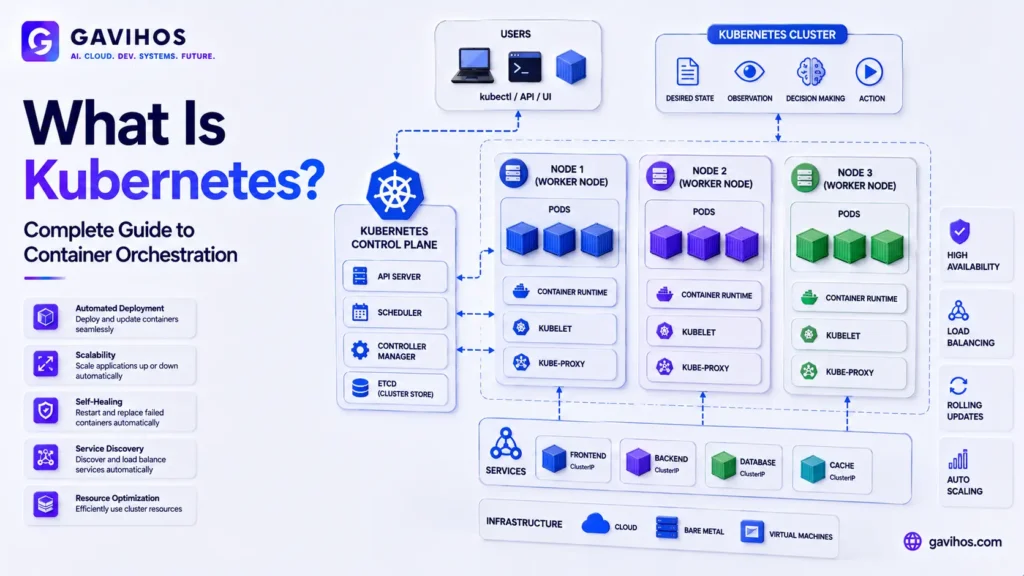
Step 2 — Submit it to the cluster. This configuration is submitted to the Kubernetes API server, the central point of control for the cluster, which stores the desired state and begins working to achieve it.
Step 3 — The scheduler places workloads. Kubernetes’s scheduler decides which physical or virtual machine (called a “node”) should run each container, based on available resources, constraints, and current cluster load.
Step 4 — Containers run inside Pods. Kubernetes’s smallest deployable unit is a Pod — one or more tightly coupled containers that share networking and storage. Most applications run as a single container per Pod, with multiple Pods providing redundancy and scale.
Step 5 — Continuous reconciliation. Kubernetes doesn’t just set things up once — it continuously compares the actual state of the cluster to the desired state. If a Pod crashes, a node fails, or resource needs change, Kubernetes takes corrective action automatically (restarting Pods, rescheduling them elsewhere, or adjusting resource allocation) without requiring a human to intervene for routine failures.
Step 6 — Services provide stable networking. Because individual Pods can be created and destroyed as part of normal operation, Kubernetes uses a separate concept called a Service to give a stable network address that routes traffic to whichever healthy Pods are currently running, regardless of how many times the underlying Pods have changed.
Architecture / Components
| Component | Role | Why It Matters |
|---|---|---|
| Node | A physical or virtual machine that runs containerized workloads | The actual compute resource Kubernetes schedules work onto |
| Pod | The smallest deployable unit — one or more containers sharing network/storage | How Kubernetes actually runs your application |
| Deployment | Manages a set of identical Pods, handling scaling and rolling updates | Gives you declarative control over “how many copies, updated how” |
| Service | A stable network endpoint routing to a set of Pods | Solves the problem of Pods being ephemeral and frequently replaced |
| Control Plane / API Server | The central management layer that stores desired state and coordinates the cluster | The “brain” of the cluster — everything else reacts to what it decides |
| Scheduler | Decides which node runs which Pod | Handles the resource-placement problem automatically instead of manually |
| kubelet | An agent running on each node that manages the containers on that node | The component that actually starts/stops containers per the control plane’s instructions |
Real World Use Cases
1. Running microservices architectures at scale. Organizations with many independently deployable services use Kubernetes to manage the deployment, networking, and scaling of dozens or hundreds of services consistently.
2. AI/ML model training and inference. Kubernetes is widely used to schedule GPU-backed training jobs and to scale inference services up and down based on real-time demand, treating ML workloads as another category of containerized job to orchestrate.
3. Multi-cloud and hybrid-cloud deployments. Because Kubernetes runs consistently across cloud providers and on-premises infrastructure, it’s a common choice for organizations that need workload portability across environments.
4. CI/CD pipelines and ephemeral environments. Kubernetes is frequently used to spin up short-lived environments for testing pull requests or running build pipelines, taking advantage of its ability to create and tear down workloads programmatically.
5. High-availability production web applications. E-commerce platforms, SaaS products, and other applications with strict uptime requirements use Kubernetes’s self-healing and rolling-update capabilities to minimize downtime during both failures and routine deployments.
Benefits
Automated recovery from failure. Crashed containers and failed nodes are handled automatically through Kubernetes’s continuous reconciliation, reducing the operational burden of manual incident response for routine failures.
Consistent deployment across environments. The same Kubernetes configuration can run in a local development cluster, a staging environment, and production across different cloud providers, reducing “works on my machine” class problems.
Efficient resource utilization. The scheduler can pack workloads onto available compute more efficiently than manual placement, particularly across large clusters with many different workload sizes.
Portability and avoiding vendor lock-in. Because Kubernetes itself is cloud-agnostic, workloads built around it are generally easier to move between providers than those built directly on a single cloud’s proprietary compute services.
Limitations
Genuine operational complexity. Kubernetes introduces a significant number of new concepts (Pods, Services, Deployments, ConfigMaps, and more) and operational surface area — running it well requires real investment in learning and tooling, not just installing it and moving on.
Overkill for small, simple workloads. A single application with modest, predictable traffic often doesn’t need Kubernetes’s scheduling and self-healing capabilities — simpler deployment models can be both easier to operate and cheaper.
Debugging is different, not easier. Distributed, orchestrated systems introduce their own categories of failure (networking between Pods, scheduling constraints, resource limits) that require different troubleshooting skills than a single-server deployment.
Managed Kubernetes still requires Kubernetes expertise. Using a managed offering (EKS, GKE, AKS) removes control-plane operational burden, but teams still need to understand Kubernetes concepts to design, deploy, and troubleshoot workloads effectively.
Engineering Tradeoffs
What improves: Resilience to individual failures, deployment consistency across environments, and the ability to scale workloads programmatically rather than through manual intervention.
What becomes harder: The learning curve for engineers unfamiliar with container orchestration, and the number of moving parts that need to be understood to debug a production issue effectively.
New complexity introduced: Networking between Pods and Services, resource limit tuning, and cluster-level configuration are all new categories of problems that don’t exist in simpler deployment models.
Operational costs: Even with managed offerings handling the control plane, teams need ongoing investment in monitoring, security patching of worker nodes, and staying current with Kubernetes’s own release cadence.
When this approach should not be the first priority: Early-stage products with a single, simple service and low, predictable traffic often gain little from Kubernetes relative to its complexity cost — the tipping point is usually multiple services, meaningful scale, or a genuine multi-cloud/portability requirement.
Best Practices
Use a managed Kubernetes offering unless there’s a specific reason not to. Amazon EKS, Google GKE, and Azure AKS remove the burden of operating the control plane itself, letting teams focus on the workloads running on top of it.
Start with resource requests and limits set deliberately, not left as defaults. Under-specified resource limits are a common source of scheduling problems and unpredictable performance in production clusters.
Adopt Kubernetes when the problems it solves actually exist, not preemptively. Multiple services needing coordinated deployment, meaningful scale, or genuine portability requirements are the right triggers — not “we might need this eventually.”
Invest in observability tooling early. Distributed systems are harder to debug without proper logging, metrics, and tracing in place — this matters more, not less, once workloads are spread across many Pods and nodes.
Common Mistakes
Adopting Kubernetes before there’s a real need for it. Teams sometimes add Kubernetes’s complexity to a project that would run perfectly well on a simpler deployment model, mistaking industry popularity for a requirement.
Under-provisioning or over-provisioning resource limits. Setting Pod resource requests/limits too low leads to instability; setting them too high wastes cluster capacity — both require deliberate tuning based on actual observed usage.
Treating the control plane as something to ignore. Even with a managed offering handling control-plane operations, teams still need to understand how scheduling, networking, and reconciliation work to avoid subtle production issues.
Not planning for stateful workloads properly. Kubernetes was originally designed with stateless workloads in mind; running databases and other stateful services requires additional care (persistent storage, careful failover handling) that’s easy to underestimate.
What Most People Get Wrong
“Kubernetes replaces Docker.” Kubernetes is an orchestration layer that manages containers — it doesn’t replace the container runtime itself. Docker (or other container runtimes) builds and runs the containers; Kubernetes decides where and how many of them run and keeps them running.
“Kubernetes automatically makes an application scalable.” Kubernetes can scale the number of running copies of an application automatically, but the application itself still needs to be designed to run correctly as multiple, independent copies — Kubernetes doesn’t retrofit good architecture onto an application that wasn’t designed for it.
“You need Kubernetes to use containers. Plenty of production systems run containers without Kubernetes, using simpler orchestration tools or even manual deployment for smaller-scale needs. Kubernetes solves a specific scale/complexity problem — it’s not a prerequisite for containerization itself.
“Kubernetes is ‘set and forget.’ Clusters need ongoing attention: security patching, resource tuning, and staying current with Kubernetes’s release cycle. It automates a lot of routine operational work, but it isn’t zero-maintenance.
Future Outlook
Expect Kubernetes to remain the dominant container orchestration standard for the foreseeable future, with continued investment in making it more approachable for smaller teams (simplified tooling, better defaults) even as its core complexity remains real for anyone operating it seriously.
Expect AI/ML workloads to become an increasingly significant driver of Kubernetes adoption and feature development, particularly around GPU scheduling, resource sharing for expensive accelerators, and scaling inference services efficiently — a use case that didn’t exist when Kubernetes was originally designed but has become a major part of why organizations adopt it today.
Expect the ecosystem of tooling built around Kubernetes (service meshes, GitOps deployment tools, policy enforcement, observability platforms) to keep maturing, which will continue to shift the practical cost of adoption even as the underlying orchestration concepts stay relatively stable.
FAQ
1. What is Kubernetes? Kubernetes is an open-source container orchestration platform that automates the deployment, scaling, and management of containerized applications across a cluster of machines.
2. What does “K8s” mean? K8s is a common abbreviation for Kubernetes — “K,” followed by the 8 letters between K and the final “s,” then “s.”
3. What’s the difference between Docker and Kubernetes? Docker (or another container runtime) builds and runs individual containers. Kubernetes manages many containers across many machines — deciding where they run, keeping them running, and handling scaling and networking between them. They solve different, complementary problems.
4. What is a Pod in Kubernetes? A Pod is Kubernetes’s smallest deployable unit — one or more containers that share networking and storage, deployed and scaled together as a single unit.
5. Do I need Kubernetes to run containers in production? No. Simpler deployment models or lighter orchestration tools can run containers in production without Kubernetes. Kubernetes becomes valuable specifically when you need automated scaling, self-healing, and consistent multi-environment deployment at meaningful scale.
6. What is a managed Kubernetes service? A managed Kubernetes service (like Amazon EKS, Google GKE, or Azure AKS) is a cloud provider’s offering that operates the Kubernetes control plane for you, reducing the operational burden of running the cluster’s management layer yourself.
7. Is Kubernetes only useful for large companies? No, though the tipping point for adopting it usually correlates with having multiple services, meaningful scale, or a real portability requirement — company size alone isn’t the determining factor; a fast-growing startup with several interdependent services can hit the same needs as a larger organization.
8. How does Kubernetes handle a crashed container? Kubernetes continuously compares the actual state of the cluster to the desired state you’ve defined. If a Pod crashes, it automatically restarts or reschedules a replacement without requiring manual intervention.
9. Can Kubernetes run across multiple cloud providers? Yes — Kubernetes itself is cloud-agnostic and can run on AWS, Azure, Google Cloud, on-premises infrastructure, or a combination, which is a major reason it became the industry-standard orchestration layer rather than a single-provider tool.
10. Why is Kubernetes increasingly used for AI/ML workloads? AI/ML training and inference involve managing expensive resources like GPUs, scaling services based on demand, and running many jobs with varying lifecycles — exactly the resource scheduling and lifecycle management problems Kubernetes was built to solve, applied to a newer category of workload.
Analyst Perspective
The most durable thing about Kubernetes isn’t any specific feature — it’s that it standardized a problem every organization running containers at scale used to solve with custom, incompatible tooling. Before Kubernetes won out, “how do we orchestrate containers” had multiple competing answers, each requiring specialized institutional knowledge that didn’t transfer between companies. Kubernetes becoming the de facto standard means that operational knowledge, hiring, and tooling investment now compound across the industry instead of being reinvented at every company that hits container-orchestration scale.
The more interesting current shift is what’s driving new adoption: it’s increasingly AI/ML workloads, not the web-service scaling problems Kubernetes was originally built around. GPU scheduling, right-sizing expensive accelerator resources, and scaling inference services elastically are a genuinely different workload shape than the stateless web services Kubernetes’s original design assumed — and the ecosystem’s ongoing investment in this area (better GPU-aware scheduling, resource sharing primitives) is effectively a second wave of relevance for a tool that could have plausibly plateaued in importance once container orchestration itself became “solved.”
For teams evaluating whether to adopt Kubernetes today, the practical question isn’t “is Kubernetes good” — that’s been settled for years — it’s “does our actual workload shape justify the operational complexity.” Multiple coordinated services, meaningful scale, genuine multi-cloud requirements, or GPU-heavy ML workloads are legitimate triggers. A single, simple service with modest, predictable traffic usually isn’t, regardless of how standard Kubernetes has become — popularity is not the same as fit.
Key Takeaways
- Kubernetes is an open-source container orchestration platform that automates deployment, scaling, and management of containerized applications across a cluster of machines
- It uses declarative configuration — you describe the desired state, and Kubernetes continuously works to match the actual cluster state to it, including automatic recovery from failures
- Core building blocks include Pods (the smallest deployable unit), Deployments (managing sets of Pods), and Services (stable networking to ephemeral Pods)
- Kubernetes doesn’t replace Docker or other container runtimes — it orchestrates them
- Cloud-agnostic design (runs on AWS, Azure, GCP, or on-premises) is a major reason it became the industry-standard orchestration layer
- AI/ML workloads (GPU scheduling, elastic inference scaling) are an increasingly significant driver of Kubernetes adoption beyond its original web-service use case
- Adoption should be driven by actual need (multiple services, real scale, genuine portability requirements) rather than popularity alone — it’s genuinely more complex than simpler deployment models, and that complexity should be justified by the problem it solves
Continue Learning
- What Is a Data Catalog? Complete Guide to Metadata Management and Data Lineage
- Google Cloud Datastream and Dataplex Universal Catalog
- What Is epoll? The Linux I/O Event Notification Mechanism Explained
- What Is Remote Code Execution (RCE)? Complete Guide
- Vercel AI SDK Complete Guide: How to Build AI Applications in TypeScript
About GAVIHOS
GAVIHOS helps developers, founders and technology enthusiasts understand AI, software engineering and emerging technologies through practical guides, tutorials and industry analysis.
Stay Updated
Follow GAVIHOS for practical AI, technology and developer-focused insights.
External Links
| Source | URL |
|---|---|
| Kubernetes Official Documentation | https://kubernetes.io/docs/home/ |