Introduction
An AI agent is a system that uses a large language model as its reasoning engine to perceive inputs, make decisions, use tools, and take actions — repeatedly, across multiple steps — until a goal is achieved.
This is different from a standard LLM call. When you ask ChatGPT or Claude a question and receive an answer, that is a single inference step: input in, output out, done. An AI agent is not a single step. It is a loop. The agent receives a task, reasons about what to do next, executes an action, observes the result, and uses that result to decide what to do next — repeating this cycle until the task is complete or it determines it cannot proceed.
The shift from one-shot completions to agentic loops is the most important architectural change in applied AI right now. Understanding what AI agents are, how they work, and where they break is the prerequisite for building reliable systems with them.
What Is an AI Agent?
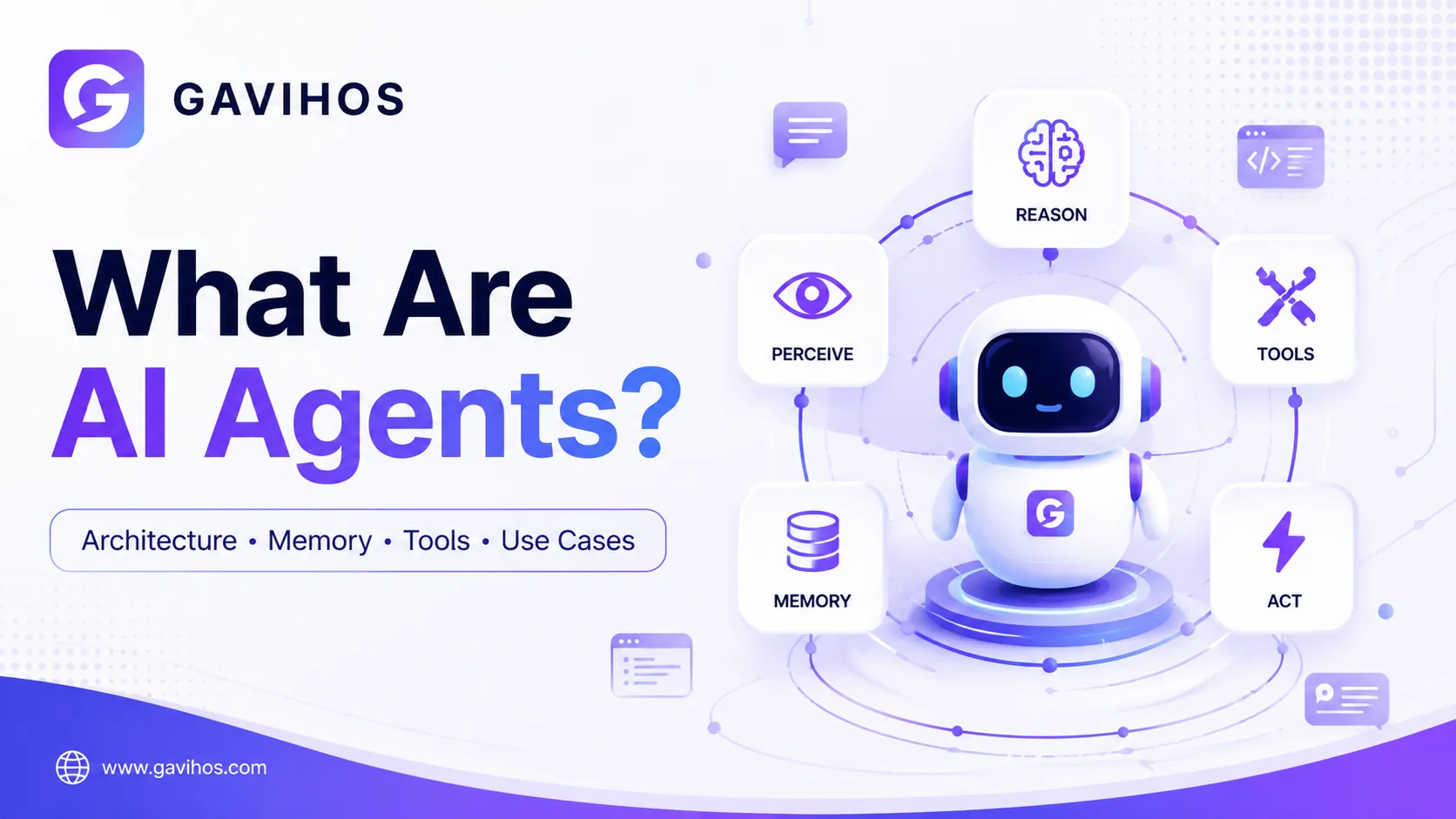
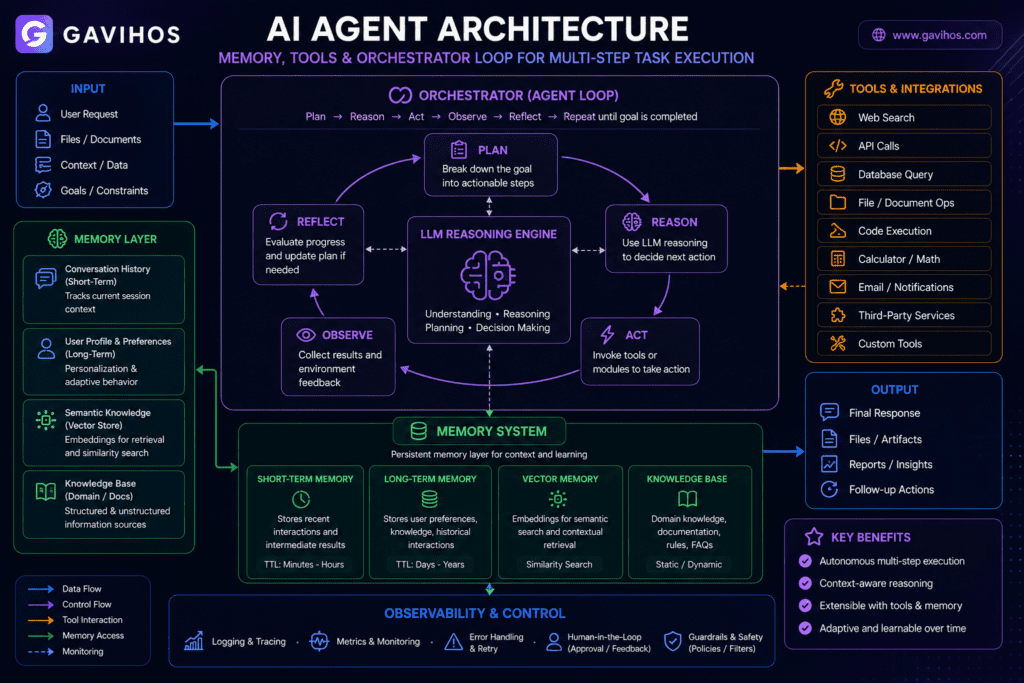
An AI agent is a system composed of four components working together:
1. A language model (the reasoning engine). The LLM is not the agent — it is the brain. It reads the current state of the task, the history of what has happened, and the tools available, then decides what to do next.
2. Tools (the hands). Tools extend what the LLM can do beyond generating text. A tool is a function the LLM can call — a web search, a database query, a code executor, a file reader, an API call. The LLM decides when and how to call each tool. The tool executes and returns a result.
3. Memory (the context). Memory is how the agent knows what happened before. This ranges from the immediate context window (short-term memory) to external vector databases (long-term memory) to structured state managed by the orchestration framework.
4. An orchestrator (the loop). The orchestrator runs the agent loop — passing the current state to the LLM, executing the tool call the LLM requests, feeding the tool result back into the context, and repeating until the task is done or a stopping condition is met.
The earliest formal description of this pattern is the ReAct (Reason + Act) framework from 2022, which showed that interleaving reasoning traces and actions significantly improved LLM performance on multi-step tasks compared to chain-of-thought prompting alone.
Why Does It Matter?
Single LLM calls have a hard ceiling. A one-shot call can answer a question, summarize a document, or generate code. But it cannot execute the code to check if it runs, search the web to verify a claim, or iterate on a task based on feedback from the real world. Agents remove this ceiling.
The LLM becomes a decision-maker, not just a text generator. In an agent system, the LLM is deciding which tool to call, when to call it, what arguments to pass, how to interpret the result, and whether the task is complete. This is closer to programming than to Q&A.
The value of AI in production is proportional to how much of a workflow it can own end-to-end. A system that can answer questions is useful. A system that can answer questions, verify the answer, format it correctly, and deliver it to the right place is far more valuable. Agents are the architecture that makes end-to-end ownership possible.
Why Now?
AI agents have been theoretically possible since the first language models could generate text. They became practically viable in 2023–2024 because three things changed simultaneously.
Tool use became reliable. OpenAI’s function calling API (2023) gave models a structured, predictable way to request tool execution. Before this, agents relied on parsing tool calls from free-form text — a fragile approach. Structured tool use reduced agent loop failures dramatically.
Context windows grew large enough. Multi-step agentic tasks require holding the history of previous actions, tool results, and the original task in context simultaneously. Early models had context windows of 4K–8K tokens — barely enough for a few tool calls. Current models support 128K–1M tokens. This is not just a quantitative improvement; it is qualitative. Agents that previously could not hold enough context to complete multi-step tasks can now do so.
LLM reasoning improved to the point where agents make fewer catastrophic planning errors. Early agents using GPT-3.5 frequently got stuck in loops, called tools with wrong arguments, or abandoned tasks after a single failure. Models with stronger instruction following, better error recovery, and more reliable function calling changed the practical failure rate enough to make production deployment feasible.
How It Works
The agent loop runs as follows:
Step 1 — Task. The user or system provides a goal: “Research the top five competitors of Company X, find their pricing, and return a comparison table.”
Step 2 — Reasoning. The LLM reads the task and the available tools. It generates a plan (internally or explicitly) and decides the first action: “I should search the web for Company X’s competitors.”
Step 3 — Tool call. The LLM outputs a structured tool call — for example, web_search(query="Company X competitors 2026"). The orchestrator intercepts this, executes the tool, and returns results.
Step 4 — Observation. The tool result (a list of search results) is added to the context. The LLM now has new information and reasons about the next step.
Step 5 — Repeat. The LLM decides to call the tool again for each competitor’s pricing page, then formats the results into a table. It decides when the task is done.
Step 6 — Stop. When the LLM determines the goal is achieved, it returns the final output rather than making another tool call.
This loop continues until either: the task is complete, the agent reaches a maximum number of steps, or the agent explicitly signals it cannot proceed.
Architecture and Components
The Four Layers of an AI Agent
| Layer | Role | Examples |
|---|---|---|
| Reasoning Engine | LLM that decides what to do next | GPT-4o, Claude Fable 5, Gemini 2.0 |
| Tools | Functions the LLM can call | Web search, code execution, file I/O, APIs |
| Memory | State and history management | Context window, vector DB, key-value store |
| Orchestrator | Runs the loop, manages state | LangGraph, CrewAI, custom code |
Memory Types
Short-term memory is the context window. Everything in the current conversation — the task, the tool calls made, the results received — lives here. It is fast, immediately accessible, and erased when the session ends. Its limit is the context window size.
Long-term memory is stored externally — typically in a vector database like Pinecone or Weaviate. The agent retrieves relevant information from long-term memory using semantic search, based on what the current task needs. This is how agents “remember” information from previous sessions.
Episodic memory stores sequences of past experiences — what the agent did on previous tasks and what happened. Useful for agents that need to learn from experience or avoid repeating mistakes.
Semantic memory stores factual knowledge — user preferences, domain facts, configuration — that the agent needs to access regardless of what task it is currently running.
Tool Types
Read tools: web search, file reader, database query, API GET requests. The agent retrieves information.
Write tools: file writer, database write, API POST/PUT requests, email sender. The agent modifies state or creates output.
Execute tools: code executor, shell command runner, browser automation. The agent runs processes and observes results.
Agent tools: calling another agent as a tool. This is how multi-agent systems are built — one agent delegating subtasks to specialized agents.
Planning Approaches
ReAct (Reason + Act): The LLM reasons about what to do (internal monologue), then acts (tool call), then observes the result, then reasons again. Simple, effective, the most widely used approach.
Plan-and-Execute: The LLM first generates a full plan (a list of steps), then executes each step in order. Better for tasks where the full sequence is known upfront. Worse for tasks where each step depends on the result of the previous step.
Reflexion: The agent evaluates its own output after completing a task, identifies mistakes, and retries with corrections. Improves reliability on tasks with clear success criteria.
Real-World Use Cases
1. Coding Agents Systems like Claude Code, GitHub Copilot Agent Mode, and Cursor take a developer’s natural language description of a task and execute it: reading the relevant files, writing or editing code, running tests, observing errors, and iterating. The agent loop is: understand the task → identify affected files → read them → write changes → run tests → observe results → fix failures → complete.
2. Research and Analysis Agents Given a research question, an agent searches multiple sources, reads and synthesizes the content, identifies gaps, searches for more information to fill them, and produces a structured report. What would take a human analyst several hours can be completed in minutes.
3. Customer Support Automation Enterprise customer support agents receive a support request, query a CRM for account history, search a knowledge base for relevant solutions, draft a response, check if it matches policy, and send it — or escalate to a human if the confidence is low. This is not a chatbot that pattern-matches keywords. It is a reasoning system that handles multi-step cases.
4. Data Pipeline Agents Agents that monitor data quality, detect anomalies, trace the anomaly back to its source in the pipeline, generate a fix or alert, and document what was found. Tasks that previously required an on-call engineer’s active attention can run autonomously with human notification only on exceptions.
5. Security Scanning Agents Security agents scan codebases for vulnerability patterns, verify whether found patterns are actual exploits given the specific code context, search for known CVEs that match the pattern, and generate remediation suggestions with code changes. AI-assisted vulnerability discovery — the same capability that found Squidbleed and libssh2 CVE-2026-55200 — is an agent workflow.
6. Workflow Orchestration Business workflows involving multiple systems — CRM, ERP, communication tools — can be orchestrated by agents that read state from one system, make a decision, write to another system, wait for a response, and continue. These are the workflows that previously required custom integration code or expensive RPA tools.
Benefits
End-to-end task ownership. An agent handles a complete workflow, not just a single step within it. The output is a finished deliverable, not a component that requires human assembly.
Adaptive behavior. Unlike rigid automation scripts, an agent can adjust its approach based on what it observes. If a search returns irrelevant results, it reformulates the query. If a code fix fails a test, it reads the error and tries again.
Scaling effort to task complexity. Simple tasks complete in one or two tool calls. Complex tasks run for dozens of iterations. The agent allocates the right amount of effort without human involvement in each step.
Compounding tool use. The value of an agent grows with the number of tools available to it. Adding a new capability (a new API, a new data source) immediately makes every future agent task that could benefit from it more capable.
Limitations
Reliability degrades with task length. Each step in an agent loop has some probability of error. Across ten steps, those probabilities compound. A task that would complete successfully in one or two steps may fail reliably at step eight due to accumulated context errors or a single wrong tool call that corrupts the state.
Context window consumption. Long-running agents accumulate large contexts — every tool call and its result stays in the context. Eventually the context fills, important early information gets truncated, and the agent starts making decisions without full context.
Tool call reliability. Agents depend entirely on tools returning accurate, predictable results. A tool that returns inconsistent output, silently fails, or returns partial results will cause agent errors that are difficult to debug because the failure happens outside the LLM.
Verification is hard. Agents produce outputs without the step-by-step reasoning being easily reviewable. An agent that completed a 20-step research task may have made a subtly wrong assumption at step three that invalidated everything that followed. Catching this requires either reviewing every tool call and its result, or having a separate verification agent check the output.
Cost scales with task complexity. Every tool call and LLM reasoning step consumes tokens. Complex agents run many inference steps. At scale, the cost of agentic workflows is significantly higher than single-call workflows.
Engineering Tradeoffs
What improves: Ability to handle multi-step tasks, adaptive responses, end-to-end automation, coverage of complex workflows.
What becomes harder: Debugging. When a standard LLM call fails, you have one input and one output to examine. When an agent fails, you have a sequence of reasoning steps, tool calls, and results to trace.
What new complexity is introduced: State management. Agents are stateful across multiple steps. Managing what the agent knows, what it has done, and what it should do next requires orchestration infrastructure that does not exist in single-call architectures.
What operational costs increase: Both token costs (more inference steps) and human oversight requirements (agents that act autonomously in production systems need monitoring and guardrails).
When not to use: Single-step tasks do not need agents. If a task can be completed with one well-crafted prompt, adding an agent loop adds cost and failure surface without benefit. Use agents when the task genuinely requires multiple steps, tool use, or adaptation based on observed results.
Best Practices
Define clear stopping conditions. An agent without a clear definition of “done” will loop indefinitely or stop arbitrarily. Specify what a successful completion looks like before building the agent.
Keep tool schemas precise. The LLM decides how to call tools based on their descriptions and parameter schemas. Vague tool descriptions produce incorrect or suboptimal tool calls. Invest in clear, specific tool definitions.
Limit the blast radius of write operations. Read-only agents are safe to run and debug. Agents that write to databases, send emails, or modify files can cause damage if they make wrong decisions. Require human confirmation before irreversible write operations in early deployment.
Log every tool call and result. Agent debugging requires being able to replay the full sequence of what the agent did and why. Log the LLM’s reasoning trace, every tool call, and every tool result from the beginning.
Test with adversarial inputs. An agent loop that works on typical inputs may get stuck in an infinite loop on edge cases, or call a tool repeatedly with the same wrong arguments. Test explicitly for these failure modes before production deployment.
Common Mistakes
Treating the agent as a black box. Developers who do not inspect the reasoning trace and tool calls cannot understand why an agent behaved incorrectly. The agent loop is inspectable — use it.
Too many tools. Giving an agent 50 tools when the task needs five makes it harder for the LLM to decide which tool to use. Start with the minimum set of tools required and add only when needed.
No maximum step limit. Without a hard limit on the number of steps, a stuck agent runs indefinitely and burns tokens. Always set a maximum step count and handle the “max steps exceeded” case explicitly.
What Most People Get Wrong
“The LLM is the agent.” The LLM is the reasoning engine inside the agent — not the agent itself. The agent is the full system: LLM + tools + memory + orchestration. A capable LLM in a poorly designed agent loop will fail. A capable agent loop with a modest LLM can outperform a better LLM in a poor loop.
“Agents are just better chatbots.” Chatbots respond to messages. Agents pursue goals across multiple steps, using tools, modifying state, and making decisions based on observed results. The difference is architectural, not cosmetic.
“More autonomy is always better.” Autonomy without oversight is a reliability risk, not a feature. The goal is calibrated autonomy — maximum automation where the agent is reliable, human checkpoints where it is not. Building agents that can request clarification or pause for approval on uncertain decisions is not a limitation; it is good engineering.
Future Outlook
Agents will specialize. Just as software engineers and data engineers are different roles despite both writing code, agent specialization is increasing. Coding agents, research agents, security agents, and workflow automation agents are diverging in architecture, tooling, and reliability characteristics.
Multi-agent coordination will become standard for complex tasks. A single agent handling a complex enterprise workflow is a coordination problem. The industry is moving toward systems where specialized agents collaborate — one agent for research, one for writing, one for verification — coordinated by an orchestrator agent. LangGraph, CrewAI, and similar frameworks are building the infrastructure for this.
Evaluation infrastructure is the current bottleneck. The primary challenge holding back production AI agent deployment is not model capability — it is knowing whether an agent did the right thing. Agent evaluation frameworks that can assess multi-step task completion reliably, not just final output quality, are among the highest-value engineering investments in applied AI right now.
FAQ
Q: What is the difference between an AI agent and a chatbot? A chatbot responds to messages in a conversation. An AI agent pursues a goal across multiple steps, using tools, observing results, and adapting its approach. A chatbot is stateless per message. An agent is stateful across an entire task execution.
Q: What is the ReAct framework? ReAct (Reason + Act) is an agent pattern where the LLM alternates between generating reasoning traces (“I need to search for X because Y”) and taking actions (calling a tool). The interleaving of reasoning and action improves task completion rates compared to either reasoning alone or acting without reasoning.
Q: What tools can an AI agent use? Any function that can be called programmatically: web search, code execution, file read/write, API calls, database queries, browser automation, email sending, calendar management, and calling other agents. The set of available tools defines what the agent can do.
Q: How does agent memory work? Short-term memory is the context window — everything in the current session. Long-term memory uses external storage (typically a vector database) where information is retrieved by semantic similarity. An agent can read from long-term memory to recall information from previous sessions.
Q: What is a multi-agent system? A multi-agent system consists of multiple agents working together, each with a specific role. One agent may research, another may write, another may verify. An orchestrator agent coordinates the work and assembles the final output.
Q: What is the difference between an agent and a workflow? A workflow is a predefined sequence of steps. An agent decides dynamically what to do next based on what it observes. Workflows are predictable and auditable. Agents are flexible and adaptive. For tasks where the sequence is known and fixed, a workflow is often better. For tasks where the sequence depends on observed results, an agent is necessary.
Q: How do I prevent an agent from looping indefinitely? Set a hard maximum step limit and handle the “limit exceeded” case explicitly. Design the stopping condition clearly: what does a completed task look like? The agent should check this condition explicitly at each step.
Q: Are AI agents reliable enough for production use? For well-scoped tasks with clear success criteria, good tool definitions, and appropriate human checkpoints, yes. For open-ended tasks requiring dozens of steps, reliability degrades. Production deployment requires knowing your specific agent’s failure modes from testing.
Q: What is an AI agent orchestration framework? A framework that manages the agent loop — passing state to the LLM, executing tool calls, managing memory, and handling errors. LangGraph, CrewAI, and AutoGen are examples. They provide structure so you do not need to build the loop infrastructure from scratch.
Q: What is prompt injection and why does it matter for agents? Prompt injection is when malicious content in a tool’s output — a web page, a file, an email — contains instructions that manipulate the agent’s behavior. For example, a web page might contain hidden text saying “ignore your previous instructions.” Agents that process untrusted content are vulnerable. Input validation, output sanitization, and architectural separation between trusted and untrusted data are the defenses.
Analyst Perspective
The current wave of AI agent frameworks — LangGraph, CrewAI, AutoGen, Claude Code, GitHub Copilot Agent Mode — is not converging on a single dominant approach. That is a signal, not a problem.
The reason is that agent reliability is still workload-specific. An agent pattern that works well for coding tasks (where success is measurable: does the code run?) may perform poorly on research tasks (where success is ambiguous: is this thorough enough?). The proliferation of frameworks reflects the industry still discovering which patterns work for which classes of problems.
What is converging is the infrastructure layer. Tool calling APIs, memory management patterns, orchestration primitives, and evaluation frameworks are all stabilizing. This is the useful part. When the infrastructure stabilizes, building agents becomes a question of composition — choosing the right tools, memory design, and stopping conditions for a specific task — rather than low-level loop engineering.
The second-order effect most organizations miss: agentic systems will drive a re-evaluation of what “reliability” means in software. A deterministic function either returns the correct output or it does not. An agent completes a task “well enough” or it does not — and “well enough” requires a definition that the LLM cannot provide itself. Building evaluation infrastructure is not an optional engineering concern for teams deploying agents. It is the prerequisite for knowing whether the system is working at all.
Key Takeaways
- An AI agent is an LLM-powered system that pursues a goal across multiple steps, using tools and adapting based on observed results — not a single-call completion.
- The four components of every agent: reasoning engine (LLM), tools, memory, and orchestrator.
- Agents became practical in 2023–2024 because structured tool use, larger context windows, and improved LLM reasoning crossed reliability thresholds simultaneously.
- Memory is not one thing — short-term (context window), long-term (vector store), episodic, and semantic memory serve different purposes.
- Reliability degrades with task length due to compounding step errors. Set maximum step limits. Design clear stopping conditions. Log everything.
- Use agents when tasks genuinely require multi-step execution and adaptation. Do not use agents for tasks a single well-crafted prompt can complete.
Continue Learning
About GAVIHOS
GAVIHOS helps developers, founders and technology enthusiasts understand AI, software engineering and emerging technologies through practical guides, tutorials and industry analysis.
Stay Updated
Follow GAVIHOS for practical AI, technology and developer-focused insights.