Imagine your company needs a firewall. Twenty years ago, that meant ordering a physical box, waiting for it to ship, racking it in a data center, and cabling it in by hand.
Today, an engineer can get the same firewall running in minutes, without ever touching hardware. They pick it from a cloud marketplace, click deploy, and it boots as a virtual machine on infrastructure that already exists.
That “box in a file” is called a virtual appliance, and it quietly runs a huge share of the internet’s plumbing — firewalls, load balancers, VPN gateways, and more. This guide explains what a virtual appliance actually is, how it differs from both physical hardware and an ordinary virtual machine, and where it genuinely earns its place in modern infrastructure.
What Is a Virtual Appliance?
A virtual appliance is a pre-packaged virtual machine image that bundles a specific piece of software — along with its own operating system and everything needed to run it — into a single deployable unit built for one job. Instead of installing an operating system and then separately installing and configuring firewall software, load-balancing software, or VPN software on top of it, you deploy the whole thing as one image that’s already been built, tuned, and tested for that purpose.
The concept grew directly out of enterprise networking. Vendors that once sold dedicated hardware boxes — physical firewalls, WAN optimizers, load balancers — realized they could ship the exact same software as a virtual machine image instead. That image runs on a hypervisor or in a cloud environment rather than on purpose-built hardware, which is why this category is often called a virtual network appliance when the software’s job is specifically networking or security.
You’ll find virtual appliances distributed through cloud marketplaces such as AWS Marketplace, Azure Marketplace, and Google Cloud Marketplace, as well as through VMware’s virtual appliance ecosystem and platforms like Cloudflare One. In every case, the pitch is the same: skip the hardware, skip the manual software build, deploy a known-good image.
Why Does It Matter?
Technology impact. Virtual appliances let infrastructure teams treat specialized network and security functions the same way they treat any other workload — as something deployable, scalable, and version-controlled, rather than a physical object that has to be procured and shipped.
Business impact. Removing hardware procurement from the equation changes the economics of running network infrastructure. A company can deploy a virtual appliance in minutes, pay only for the compute it uses, and scale it up or down as traffic changes — none of which is possible with a fixed physical unit.
Industry impact. The rise of the virtual appliance model is part of the same broader shift as network functions virtualization (NFV) in telecom and infrastructure-as-code everywhere else: taking functions that used to require dedicated hardware and turning them into software that runs anywhere compute is available.
Why Now?
Virtual appliances themselves aren’t new — VMware and networking vendors have shipped them for well over a decade. What’s changed recently is how easy they’ve become to deploy and manage, which is steadily removing the last reasons to prefer physical hardware for most use cases.
Cloud marketplaces have matured into the default distribution channel. AWS Marketplace, Azure Marketplace, and Google Cloud Marketplace now list thousands of pre-built virtual appliance images with one-click deployment and metered billing, which has made adopting a virtual appliance no harder than subscribing to a SaaS tool.
Vendors keep lowering the friction to activate one. As one concrete, recent example, Cloudflare’s developer changelog documented on July 6, 2026 that customers can now register a Cloudflare One Virtual Appliance and generate its authentication key directly from the dashboard’s Connectors page — including key rotation — without contacting an account team first, a step that previously required manual coordination. It’s a small change on its own, but it reflects the broader trend: appliance vendors are steadily removing the manual, sales-assisted steps that used to slow deployment down.
Multi-cloud and hybrid strategies reward a portable format. A virtual appliance image can move between a private data center and a public cloud far more easily than a physical box ever could, which matters more as organizations spread workloads across multiple environments.
A few years ago, a virtual appliance was often seen as a stopgap until “real” hardware could be justified. Today, for most organizations, the calculation has flipped — hardware is now the exception, reserved for the cases where a virtual appliance genuinely cannot deliver the required throughput or physical network isolation.
How It Works
Step 1 — The vendor builds the image. A networking or security vendor packages their software together with a minimal operating system into a single virtual machine image, already configured with sensible defaults for its specific job.
Step 2 — The image is published to a marketplace. That virtual appliance is listed on a cloud marketplace (or made available for direct download for on-premises hypervisors like VMware ESXi or Microsoft Hyper-V), along with licensing and pricing terms.
Step 3 — A customer deploys it like any other VM. The engineer selects the virtual appliance, chooses the instance size and network settings, and launches it — the underlying cloud platform boots it exactly like it would boot any other virtual machine.
Step 4 — It’s configured for its specific role. Once running, the appliance is configured through its own interface — a web console, CLI, or API — to do its job: enforcing firewall rules, distributing traffic across servers, or terminating VPN connections.
Step 5 — It’s licensed, monitored, and updated. Most virtual appliances are billed by the hour or by throughput, and updates typically arrive as a new image version to deploy rather than an in-place patch, which keeps the appliance’s tested configuration intact.
Architecture / Components
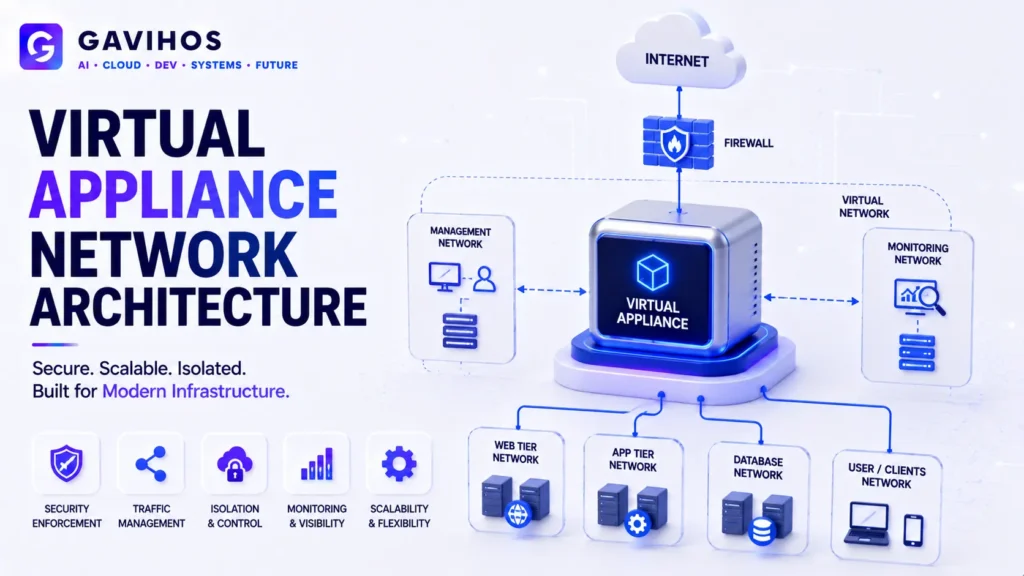
| Component | Role | Why It Matters |
|---|---|---|
| Base OS | A minimal, hardened operating system bundled inside the image | Reduces attack surface compared to a general-purpose OS install |
| Appliance software | The actual firewall, load balancer, VPN gateway, or similar function | This is the entire reason the virtual appliance exists |
| Virtual machine image | The packaged, deployable file (OVA, AMI, VHD, etc.) | Makes the appliance portable across hypervisors and clouds |
| Marketplace listing | The distribution and licensing wrapper around the image | Where customers actually discover and deploy the appliance |
| Management interface | Console, CLI, or API used to configure the running appliance | Where day-to-day operational work happens after deployment |
Real World Use Cases
1. Next-generation firewalls. Security teams deploy a virtual firewall appliance from vendors like Palo Alto Networks or Fortinet directly into a cloud VPC, getting the same inspection capabilities as a physical firewall without racking hardware.
2. Load balancers. Companies running traffic-sensitive applications deploy a virtual load-balancing appliance (from vendors such as F5 or Citrix) in front of their application servers, scaling it alongside the workload it’s balancing.
3. VPN gateways. Organizations connecting remote offices or remote employees to internal networks deploy a VPN gateway appliance as a virtual machine, avoiding the need for a physical VPN concentrator at every site.
4. WAN optimization. Distributed companies use virtual WAN optimization appliances to reduce latency and bandwidth costs between offices connected over the internet, replacing what used to require dedicated hardware at each location.
5. Secure network access platforms. Services like Cloudflare One let customers deploy a virtual appliance that connects a private network into a zero trust access platform, handling authentication and traffic routing without on-site hardware.
Benefits
Fast deployment. A virtual appliance can be running in minutes instead of the days or weeks required to procure, ship, and rack physical hardware.
Lower upfront cost. Paying for compute by the hour instead of buying a physical unit outright turns a capital expense into an operating expense that scales with actual usage.
Elastic scaling. A virtual appliance can be resized or replicated to handle more traffic, something a fixed physical box simply cannot do without buying another box.
Simplified disaster recovery. Because a virtual appliance is just a file, it can be backed up, cloned, and redeployed in a different region far more easily than physical hardware.
Limitations
Performance ceilings. A virtual appliance shares the underlying host’s CPU, memory, and network bandwidth with other workloads, so extremely high-throughput scenarios sometimes still favor purpose-built hardware with dedicated network processors.
Licensing complexity. Many virtual appliances carry their own licensing on top of the cloud compute cost, and getting the sizing and licensing tier wrong is a common source of unexpected bills.
Vendor lock-in at the configuration layer. While the virtual machine format is portable, the appliance’s configuration and licensing are often tied to a specific vendor, so switching providers still requires real migration work.
Still needs patching and lifecycle management. A virtual appliance removes hardware maintenance, but the software inside it still needs security patches, version upgrades, and monitoring — it doesn’t eliminate operational responsibility.
Engineering Tradeoffs
What improves: Deployment speed, elasticity, and the ability to treat network and security functions as part of normal infrastructure-as-code workflows instead of a separate hardware procurement process.
What becomes harder: Predicting performance under load, since a virtual appliance’s throughput depends on the underlying virtualized environment rather than dedicated silicon.
New complexity introduced: Licensing models that mix vendor fees with cloud compute costs, and the need to track appliance image versions the same way you’d track any other software dependency.
Operational costs: Ongoing compute spend replaces the one-time hardware purchase, which can be cheaper at low scale but comparable or more expensive at sustained high scale.
When this approach should not be used: Extremely latency-sensitive or throughput-intensive network functions — carrier-grade routing, for example — still often justify dedicated hardware appliances where every microsecond and packet-per-second counts.
Best Practices
Size the instance to the appliance’s actual workload, not a guess. Under-provisioning compute for a virtual appliance is a common cause of dropped connections and degraded throughput.
Track image versions like software dependencies. Treat virtual appliance updates as deliberate version upgrades with testing, not something to leave on autopilot.
Separate licensing costs from compute costs when budgeting. Many teams underestimate total cost of ownership by only accounting for the cloud instance price and ignoring the vendor’s appliance license.
Use marketplace deployments for standard cases, custom builds only when necessary. A pre-built virtual appliance from a reputable marketplace is almost always a better starting point than building an equivalent image from scratch.
Common Mistakes
Assuming a virtual appliance performs identically to its hardware equivalent. Throughput benchmarks for physical appliances don’t automatically transfer to a virtualized deployment on shared infrastructure.
Deploying without understanding the licensing model. Some vendors license by throughput, others by instance count — mismatching the license tier to actual usage is a frequent, avoidable cost surprise.
Treating the appliance as immutable. Some teams deploy a virtual appliance once and never update it, missing security patches that a general-purpose server would normally receive automatically.
Ignoring network placement. A virtual appliance still needs to sit in the correct place in the network path (in front of the traffic it’s meant to inspect or balance) — misconfigured routing is one of the most common deployment errors.
What Most People Get Wrong
“A virtual appliance is just a virtual machine.” Technically it runs as a VM, but the defining trait of a virtual appliance is that it’s purpose-built and pre-configured for one function, shipped as a locked-down unit — not a general-purpose server you’re expected to build software on top of.
“Virtual appliances are always slower than hardware.” This was truer a decade ago. Modern virtualization and cloud networking have closed much of the performance gap for most workloads; the exceptions are specific high-throughput cases, not the general rule.
“Any VM image counts as a virtual appliance.” A generic Linux server image you configure yourself is not a virtual appliance — the term specifically describes software that’s pre-packaged and pre-configured to perform a defined appliance function out of the box.
“Virtual appliances eliminate all operational work.” They remove hardware maintenance, not software maintenance — patching, licensing, and monitoring responsibilities still exist.
Future Outlook
Expect cloud marketplaces to keep expanding their virtual appliance catalogs, with more vendors offering self-serve deployment and licensing flows similar to the dashboard-based registration Cloudflare rolled out for its own virtual appliances — removing manual, sales-assisted steps that used to slow adoption.
Expect the line between a “virtual appliance” and a managed cloud-native service to keep blurring, as more vendors offer their appliance’s function as a fully managed service instead of an image customers deploy and operate themselves.
Expect specialized hardware to remain relevant only at the extremes — the highest-throughput, lowest-latency network functions — while the vast majority of firewall, load balancing, and VPN needs continue shifting toward the virtual appliance model.
FAQ
1. What is a virtual appliance? A virtual appliance is a pre-packaged virtual machine image that bundles an operating system and a specific piece of software — such as a firewall, load balancer, or VPN gateway — into one deployable unit built for a single purpose.
2. How is a virtual appliance different from a physical appliance? A physical appliance is dedicated hardware you procure, ship, and rack. A virtual appliance is a software image running the same function on a hypervisor or in the cloud, with no physical hardware to manage.
3. How is a virtual appliance different from a regular virtual machine? A regular VM is a general-purpose server you configure yourself. A virtual appliance is pre-built and pre-configured for one specific function, shipped as a locked-down, ready-to-run unit.
4. Where do you get a virtual appliance? Common sources include cloud marketplaces such as AWS Marketplace, Azure Marketplace, and Google Cloud Marketplace, as well as vendor downloads for hypervisors like VMware ESXi, and platforms such as Cloudflare One.
5. Is a virtual appliance the same as a virtual network appliance? “Virtual network appliance” usually refers specifically to virtual appliances that perform networking or security functions, like firewalls or load balancers — it’s a subset of the broader virtual appliance category.
6. Do virtual appliances cost less than physical hardware? Often yes at lower scale, since you avoid upfront hardware cost and pay only for compute used. At very high, sustained scale, the ongoing compute and licensing costs can become comparable to or more expensive than hardware.
7. Can a virtual appliance handle enterprise-scale traffic? Many can, and most enterprise firewall, load balancer, and VPN vendors now offer virtual appliance versions of their products. The exceptions are extreme, carrier-grade throughput requirements where dedicated hardware still has an edge.
8. Do virtual appliances need to be patched? Yes. A virtual appliance still runs software that needs security updates and version upgrades — deploying it doesn’t remove that responsibility, it just removes hardware maintenance.
9. What formats do virtual appliances come in? Common formats include OVA/OVF for VMware environments, AMI for AWS, and VHD for Azure and Hyper-V — the image format has to match the platform it’s deployed on.
10. Is Cloudflare One Virtual Appliance the same thing as a firewall virtual appliance? It’s the same general concept — a pre-packaged virtual appliance — applied to connecting a private network into Cloudflare’s zero trust platform rather than to firewalling or load balancing specifically.
Analyst Perspective
The most important thing about the virtual appliance model isn’t that it’s cheaper or faster than hardware — both are true, but neither is the real story. The real story is that it changed who gets to make infrastructure decisions. Deploying a physical firewall required procurement approval, a shipping timeline, and a data center technician. Deploying a virtual appliance requires a marketplace subscription and a few minutes, which means the decision moved from a capital planning process down to an engineer’s afternoon.
That shift has a second-order effect worth watching: as appliance vendors compete to remove friction from that afternoon — Cloudflare’s dashboard-based registration for its own virtual appliance is one small, recent example — the appliance market increasingly resembles the SaaS market it once looked nothing like. Self-serve trials, usage-based billing, and instant activation are becoming table stakes for appliance vendors the same way they already are for application software.
The practical implication for infrastructure teams is that “should we use a virtual appliance or build this ourselves” is rarely the right question anymore for standard functions like firewalls, load balancers, and VPN gateways — the honest question is whether your specific throughput and latency requirements are extreme enough to still justify dedicated hardware, and for most organizations, the answer is no.
Key Takeaways
- A virtual appliance is a pre-packaged virtual machine image bundling an OS and a specific piece of software — like a firewall, load balancer, or VPN gateway — into one ready-to-deploy unit
- It differs from a physical appliance by removing hardware procurement entirely, and from a general-purpose VM by being pre-configured for one specific job rather than built up from scratch
- Virtual appliances are distributed through cloud marketplaces (AWS, Azure, GCP), VMware’s ecosystem, and platforms like Cloudflare One
- Vendors are steadily reducing deployment friction — Cloudflare’s July 2026 changelog added self-serve dashboard registration for its own virtual appliance, removing a manual, sales-assisted step
- Benefits include fast deployment, elastic scaling, and lower upfront cost; limitations include performance ceilings under extreme load and added licensing complexity
- Dedicated hardware still makes sense at the extremes of throughput and latency, but for most firewall, load balancing, and VPN use cases, the virtual appliance model is now the default choice
Continue Learning
- What Is Kubernetes, Explained? A Complete 2026 Guide to Container Orchestration
- What Is a Data Catalog? Complete Guide to Metadata Management and Data Lineage
- Google Cloud Datastream and Dataplex Universal Catalog
- What Is epoll? The Linux I/O Event Notification Mechanism Explained
- What Is Remote Code Execution (RCE)? Complete Guide
About GAVIHOS
GAVIHOS helps developers, founders and technology enthusiasts understand AI, software engineering and emerging technologies through practical guides, tutorials and industry analysis.
Stay Updated
Follow GAVIHOS for practical AI, technology and developer-focused insights.
External Links
| Source | URL |
|---|---|
| Cloudflare Developer Changelog | https://developers.cloudflare.com/changelog/ |
| AWS Marketplace Documentation | https://docs.aws.amazon.com/marketplace/ |
| Microsoft Azure Marketplace Documentation | https://learn.microsoft.com/en-us/marketplace/ |
| VMware Virtual Appliance Documentation | https://docs.vmware.com/ |