Introduction
Most AI tutorials show you how to make a single LLM call. Real applications need more: multiple steps, conditional branching, tool use, state that persists across turns, and the ability to pause for human review before continuing. That is the gap LangGraph fills.
LangGraph is a Python library for building stateful, multi-step AI workflows. It models execution as a graph — nodes represent computation steps, edges represent the flow of control between them, and a shared state object tracks everything the workflow knows at any point. It was built specifically because the earlier, simpler approach to LLM orchestration — a fixed loop that calls tools until it reaches an answer — breaks down quickly in production.
This guide explains what LangGraph is, how it works, when to use it, and what the real engineering tradeoffs look like.
What Is LangGraph?
LangGraph is an open-source Python library developed by LangChain. It provides a graph-based execution model for LLM applications, where the developer defines a directed graph of computation steps and LangGraph handles the execution, state management, and persistence.
The core idea: instead of writing an agent as a while loop that runs until done, you write it as a graph where each node is a function and each edge is a routing decision. This gives you explicit control over what happens at every step — which is essential once workflows become complex enough to need it.
LangGraph is not a replacement for LangChain’s existing components. Tool definitions, retrievers, and LLM wrappers from LangChain all work inside LangGraph nodes. LangGraph is the execution layer — it decides what runs, in what order, and what state flows between steps.
Why Now?
LangGraph’s design makes sense once you understand what came before it and why it was insufficient.
The original approach to LLM agents — used in early LangChain and similar libraries — was a fixed execution loop called an AgentExecutor. The model was given a task and a set of tools, and the loop ran until the model decided it was done. This worked for simple demos. It broke in production for several reasons:
No controllable branching. If you wanted different logic depending on what the model returned, you had to hack it in externally. The loop gave the model full control; the developer had very little.
No persistence. If the process crashed or you needed to pause for human review, the entire execution state was lost. There was no standard way to checkpoint and resume.
No parallel execution. Steps in the same loop ran sequentially. If you needed to run independent subtasks simultaneously, the loop model had no good answer.
Debugging was opaque. A long agent execution produced confusing output with no clear visibility into which step caused a failure.
LangGraph replaced this with a graph model that addresses all of these directly. Branching is explicit in the edges. State is typed and visible. Checkpointing is built in. Parallel nodes are supported. And because you define the graph structure yourself, you know exactly what execution path is possible.
How LangGraph Works
The State Object
Everything in a LangGraph workflow flows through a shared state object. This is a typed dictionary — typically defined as a Python TypedDict or dataclass — that every node can read from and write updates to.
When a node runs, it receives the current state as input. It returns a dictionary of updates to that state. LangGraph merges those updates back into the state before passing it to the next node.
This is the key design choice. State is not passed as arguments between function calls — it is accumulated in a shared structure. Every node sees the full context the workflow has built up so far.
Nodes
A node is a Python function. It takes the current state as input and returns a dictionary of state updates. Nodes do the work: they call an LLM, execute a tool, run validation logic, format output, or anything else your workflow needs.
Nodes can also be LangChain runnable objects — a chain, a retriever, or an LLM call — wrapped to accept and return the state format LangGraph expects.
Edges
Edges connect nodes. They define what runs next. LangGraph supports two types:
Unconditional edges always route from one node to the next. Use these for linear steps that always execute in sequence.
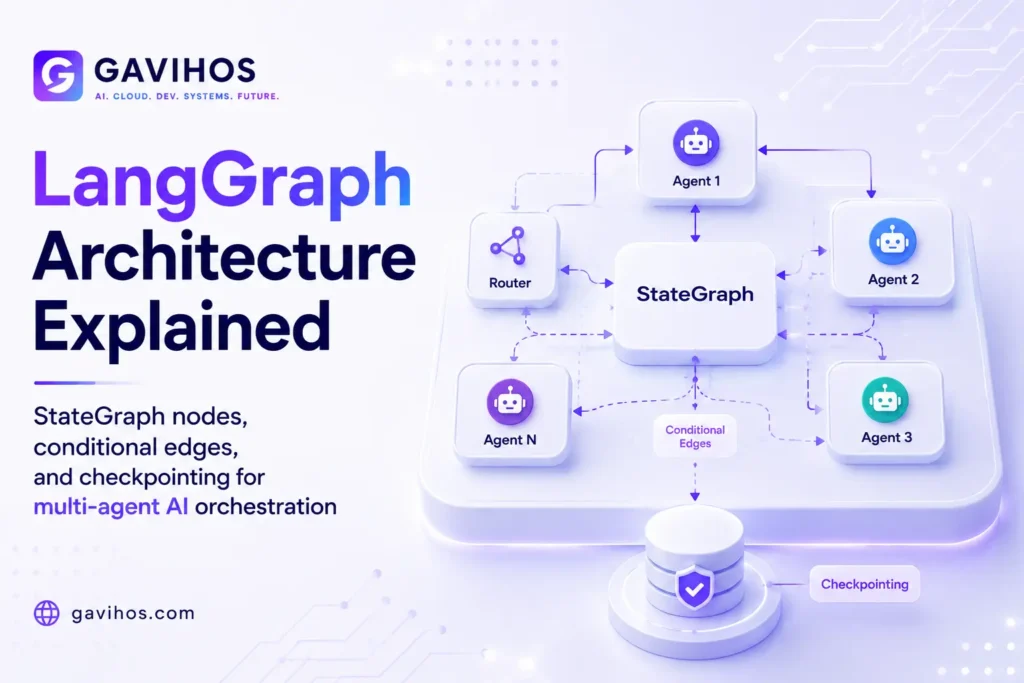
Conditional edges route to different nodes depending on a function’s return value. This is how you implement branching: write a function that inspects the current state and returns the name of the node to go to next. LangGraph follows that routing decision.
The combination of conditional edges and typed state gives you fully controllable execution flow — any workflow structure you can draw on a whiteboard, you can implement in LangGraph.
Checkpointing
LangGraph has a built-in checkpointing interface. After each node executes, LangGraph can save the current state to a persistence layer — a local MemorySaver for development, or a PostgresSaver or RedisSaver for production.
If the process restarts, LangGraph can reload from the checkpoint and continue execution from where it left off. This is what makes long-running workflows recoverable and what makes human-in-the-loop workflows possible: you can interrupt execution after a node, wait for human input, and resume without starting over.
Interrupts
Interrupts let you pause a running graph and hand control back to the application. A common use case: a workflow that drafts a response, interrupts to ask a human to review and approve it, then continues only after approval.
The human’s input is injected into the state, and the graph resumes from the interruption point. This is not possible with a simple execution loop — it requires the state persistence and resumption that LangGraph’s checkpointing provides.
Architecture Components
| Component | Role |
|---|---|
| StateGraph | The graph definition — nodes, edges, entry point, end condition |
| State Schema | Typed dictionary defining all state fields and their types |
| Nodes | Functions that read state, do work, return state updates |
| Edges | Routing rules between nodes (unconditional or conditional) |
| Checkpointer | Persistence layer — saves and restores state (MemorySaver, PostgresSaver) |
| Interrupt | Pause mechanism — suspends execution for human input or external events |
| Streaming | Event emission during execution — useful for real-time UI updates |
Real-World Use Cases
1. Customer Support Agent
A support agent needs to: understand the customer’s issue, look up their account, check relevant documentation, draft a response, and escalate to a human if the issue is complex. Each of these is a node. Conditional edges route to escalation if a classification node flags the issue as high-priority. State carries the conversation history, account data, and draft response throughout.
2. Code Review Pipeline
A pipeline that receives a pull request, runs static analysis, generates an LLM review, checks coverage, and posts a summary comment. Parallel nodes handle static analysis and coverage simultaneously. A conditional edge sends the summary to a “request changes” node or an “approve” node based on whether critical issues were found.
3. Research Agent
A research workflow that receives a question, plans a search strategy, executes multiple parallel searches, synthesizes the results, validates the synthesis against sources, and returns a final answer with citations. The validation node can route back to the search step if confidence is too low — creating a loop that runs until quality criteria are met.
4. Document Processing
Ingesting and processing contracts: extract key clauses, validate required fields, flag unusual terms, generate a summary, and route to legal review if flagged terms are present. The interrupt mechanism holds execution at the legal review node until a reviewer marks it complete.
5. Multi-Model Routing
A workflow where complex reasoning tasks go to a frontier model (Claude Opus, GPT-5.6 Sol), routine execution steps go to a faster, cheaper model (Haiku, Luna), and retrieval steps go to a model optimized for long context. Conditional edges based on task type route to the appropriate model node.
Benefits
Explicit control flow. You decide what happens at every step. No more relying on the model to loop correctly — routing logic lives in your code, not in the LLM’s output.
Built-in persistence. Checkpointing is not something you bolt on later. It is part of the framework from the start, which means long-running and resumable workflows are a first-class pattern.
Debuggability. Because state is typed and visible at every step, you can inspect exactly what the graph knew at each point and trace failures to their cause.
Parallel execution. LangGraph supports running multiple nodes concurrently. Independent subtasks do not have to wait for each other.
Human-in-the-loop by design. Interrupts make human review a built-in workflow feature, not a workaround.
Limitations
Overkill for simple agents. A single-step LLM call or a straightforward chatbot does not need a graph. The setup overhead is not justified.
Steeper learning curve. The graph model requires a shift in how you think about agent execution. Teams comfortable with procedural code may find it unintuitive initially.
Operational complexity from persistence. Production checkpointing requires a database. That is an infrastructure dependency you need to manage, back up, and monitor.
TypeScript support is less mature. LangGraph.js exists but the ecosystem, documentation, and community are thinner than the Python version.
Engineering Tradeoffs
What improves: Control, observability, resilience, and the ability to build complex workflows that would otherwise require significant custom infrastructure.
What becomes harder: The graph definition requires upfront design. You need to think about your entire workflow before writing code, which is the right discipline for production systems but feels slow at the prototyping stage.
New complexity introduced: State schema management becomes a design concern. As workflows evolve, state shapes change — and unlike a function signature, a state schema is shared across all nodes, so incompatible changes break the whole graph.
Operational costs increase: Checkpointing to a database adds latency per step and requires operational overhead. For high-volume applications, this adds up.
When not to use it: If your workflow is linear, stateless, and short-running, LangGraph adds complexity without value. A simple chain or a single LLM call is often the right answer. Start with the simplest thing that works; reach for LangGraph when you hit the ceiling.
Best Practices
Define your state schema carefully. It is the contract between all your nodes. Adding new fields is easy; removing or renaming them breaks existing checkpoints.
Name your nodes descriptively. Graph debugging starts with reading node names in execution traces. analyze_sentiment is useful; node_3 is not.
Use TypedDict for state. This gives you static type checking across nodes and makes state-related errors visible before runtime.
Start with MemorySaver, migrate to PostgresSaver for production. Do not add database infrastructure before you need it.
Prefer conditional edges over logic inside nodes. Routing decisions belong in edges, not buried inside node functions. It keeps the graph structure visible and the nodes testable in isolation.
Common Mistakes
Putting too much logic inside nodes. Nodes should do one thing. Routing logic inside a node means your graph structure is invisible — it cannot be reasoned about from the graph definition alone.
Skipping state typing. Untyped state dicts cause subtle bugs where a node expects a field that was never set. TypedDict with explicit field definitions prevents this.
Not handling None state fields. Nodes receive the full state object. Fields that have not been set yet are None. Forgetting to check for None is a common source of runtime errors early in development.
Building all workflows in LangGraph from day one. Use LangGraph for workflows that genuinely need state management, branching, or persistence. Not every AI feature in your application requires it.
What Most People Get Wrong
“LangGraph replaces LangChain.” No. LangGraph is an execution layer. LangChain’s tools, retrievers, and LLM wrappers work inside LangGraph nodes. They are complementary, not competing.
“LangGraph is only for multi-agent systems.” Multi-agent systems benefit greatly from LangGraph, but a single-agent workflow with complex routing and human-in-the-loop requirements benefits equally. The graph model is not inherently multi-agent.
“You need LangChain to use LangGraph.” LangGraph can be used with any LLM provider — Anthropic, OpenAI, Google, local models via Ollama — without importing LangChain components. The dependency is optional.
“Checkpointing is just for crash recovery.” Checkpointing also enables human-in-the-loop, time-travel debugging (rewind to any checkpoint and re-run from there), and workflow versioning. These are production features, not just safety nets.
Future Outlook
LangGraph is already the dominant open-source framework for production multi-agent orchestration in Python. Its trajectory follows the direction of agentic AI generally: more focus on long-running workflows, better tooling for observability, and tighter integration with cloud-native infrastructure.
LangChain has also released LangGraph Platform — a managed deployment and observability layer for LangGraph applications. As the framework matures, expect better first-class support for distributed execution (running different nodes in different services), tighter integration with model provider tools (Anthropic’s tool use, OpenAI’s function calling), and improved debugging tooling.
The deeper trend: as AI applications move from single-turn queries to multi-step workflows that execute over minutes or hours, the need for an execution model that handles state, branching, and persistence becomes unavoidable. LangGraph is positioned at the center of that shift.
FAQ
1. What is LangGraph? LangGraph is an open-source Python library for building stateful, multi-step AI workflows using a directed graph model. Nodes represent computation steps, edges define control flow, and a shared state object carries data between steps.
2. Is LangGraph the same as LangChain? No. LangGraph is a graph execution framework developed by LangChain. LangChain components (tools, retrievers, LLM wrappers) work inside LangGraph nodes, but LangGraph itself handles the execution layer, not LangChain’s chain model.
3. Do I need LangChain to use LangGraph? No. LangGraph can be used with any LLM provider. The LangChain library is not a required dependency.
4. What is a StateGraph in LangGraph? StateGraph is the core class in LangGraph. You define your graph structure on it — adding nodes, defining edges, setting the entry point — and then compile it into an executable runnable.
5. What is checkpointing in LangGraph? Checkpointing saves the graph’s state to a persistence layer after each node executes. It allows workflows to be interrupted and resumed, enables human-in-the-loop review patterns, and provides recovery from failures.
6. What is the difference between conditional and unconditional edges? Unconditional edges always route from one node to a specific next node. Conditional edges call a function that inspects the current state and returns which node to route to — enabling branching logic.
7. When should I use LangGraph instead of a simple LLM call? Use LangGraph when your workflow needs: branching based on model output, multiple sequential steps with shared state, human-in-the-loop review, parallel execution of independent steps, or the ability to resume after failure. For simple single-step tasks, a direct LLM call is sufficient.
8. Does LangGraph support TypeScript? Yes, via LangGraph.js. The Python version is more mature and has a larger ecosystem, but TypeScript support is actively developed.
9. What persistence backends does LangGraph support? LangGraph supports MemorySaver (in-process, for development), PostgresSaver, RedisSaver, and a custom interface for implementing your own persistence backend.
10. What is an interrupt in LangGraph? An interrupt pauses graph execution at a specific node and returns control to the calling application. It is used to implement human-in-the-loop patterns where a human must review or approve something before execution continues.
Analyst Perspective
LangGraph solves the right problem at the right time, but most teams are still using it wrong.
The framework is designed for workflows — sequences of steps with defined state, branching, and persistence. It is not designed to be the shell around every LLM call in your application. The common mistake is wrapping simple operations in LangGraph because it is the “right” framework to use for agents, and then wondering why the application is complex to maintain.
The useful mental model: LangGraph is infrastructure for long-running, stateful, resumable processes. Anything that runs in under a second and never needs to be paused probably does not need it. Anything that runs for multiple turns, involves human review, uses parallel subtasks, or needs to recover from mid-execution failures — that is exactly what LangGraph is for.
The second-order effect worth watching: LangGraph’s checkpointing model is effectively a standard for how AI workflow state should be persisted and recovered. As organizations build more complex agentic systems, the question of “where does the state live and how is it recovered?” becomes a production engineering problem, not just an architecture sketch. LangGraph is currently the clearest answer the industry has to that question. That is a durable moat if they maintain it.
For teams evaluating LangGraph vs alternatives (AutoGen, CrewAI, Dify): LangGraph gives you more control and requires more work to configure. AutoGen and CrewAI abstract more of the orchestration but restrict what custom control flow you can implement. If you need customization and are building for production, LangGraph. If you need something running in a day and the pattern fits, CrewAI or AutoGen may be faster. If the pattern does not fit, you will hit their ceiling quickly.
Key Takeaways
- LangGraph models AI workflows as directed graphs — nodes do computation, edges control flow, and state flows through the entire graph
- It was built to replace fixed execution loops that could not handle branching, persistence, or parallel execution in production
- The StateGraph, typed state schema, nodes, conditional edges, and checkpointer are the five concepts you need to understand before writing any code
- Checkpointing makes workflows resumable — essential for human-in-the-loop patterns and recovery from failures
- Use LangGraph for stateful, multi-step, long-running workflows; it is overkill for simple, short, single-step operations
- LangGraph is not a LangChain dependency — it works with any LLM provider
Continue Learning
- What Are AI Agents? Architecture, Memory, Tools and Real-World Use Cases
- What is Agentic AI? How Autonomous AI Systems Think and Act
- What is MCP? Complete Guide to Model Context Protocol
- What is RAG? Retrieval-Augmented Generation Explained
- Claude Extended Thinking Mode: Developer Guide to the GA Release
About GAVIHOS
GAVIHOS helps developers, founders and technology enthusiasts understand AI, software engineering and emerging technologies through practical guides, tutorials and industry analysis.
Stay Updated
Follow GAVIHOS for practical AI, technology and developer-focused insights.
External Links
| Source | URL |
|---|---|
| LangGraph Official Documentation | https://langchain-ai.github.io/langgraph/ |