Introduction
AI models like Claude, GPT, and Gemini are powerful on their own. But on their own, they are also isolated.
They cannot read your files. They cannot query your database. They cannot call your internal APIs. They can only work with what you paste into the chat window.
This is a serious limitation for anyone trying to build real AI-powered applications.
Model Context Protocol (MCP) solves this problem. It is a standard that connects AI models to the tools, data, and systems they need to do meaningful work.
In this guide you will learn:
- What MCP is and why it was created
- How MCP works technically
- The three things MCP servers can expose to an AI
- Real-world use cases across industries
- How to start using MCP today
- The limitations you need to understand before building with it
What Is Model Context Protocol (MCP)?
Model Context Protocol (MCP) is an open standard that defines how AI applications connect to external tools, data sources, and services.
It was introduced by Anthropic in November 2024 and has since been adopted by every major AI vendor — including OpenAI, Google, Microsoft, and AWS.
Think of MCP as a universal adapter for AI.
Before MCP, every AI tool had its own proprietary way of connecting to external systems. If you wanted Claude to query your database and Cursor to read from the same database, you had to build two separate integrations. If you then wanted to add a third AI tool, you built a third integration. The work multiplied with every new tool.
MCP replaces all of that with one standard. Build the integration once, and any MCP-compatible AI can use it.
As of June 2026, MCP has surpassed 97 million monthly SDK downloads and powers over 5,800 servers across the ecosystem. It is no longer an experimental protocol. It is production infrastructure.
Why Does MCP Matter?
For Developers
Before MCP, connecting an AI to your systems meant writing custom code for every combination of AI model and data source. A team using three AI tools with five data sources needed fifteen integrations to maintain.
MCP reduces that to five. You build one MCP server per data source, and any AI that speaks MCP can use it.
For Enterprises
AI is being embedded into enterprise workflows at an unprecedented rate. Gartner projects that 40% of enterprise applications will include task-specific AI agents by end of 2026.
For that to work safely, AI models need controlled, auditable access to enterprise data. MCP provides exactly that — a structured interface with clear boundaries around what an AI can and cannot access.
56% of enterprises now have a dedicated AI agent operations role. That role needs a standard to work with. MCP is that standard.
For the Industry
MCP has become the connective tissue of agentic AI. When AI models need to take multi-step actions — research a topic, write a document, save it to a system, and notify a team member — they need to coordinate across tools. MCP makes that coordination possible without requiring every tool vendor to build bespoke integrations with every other.
How MCP Works
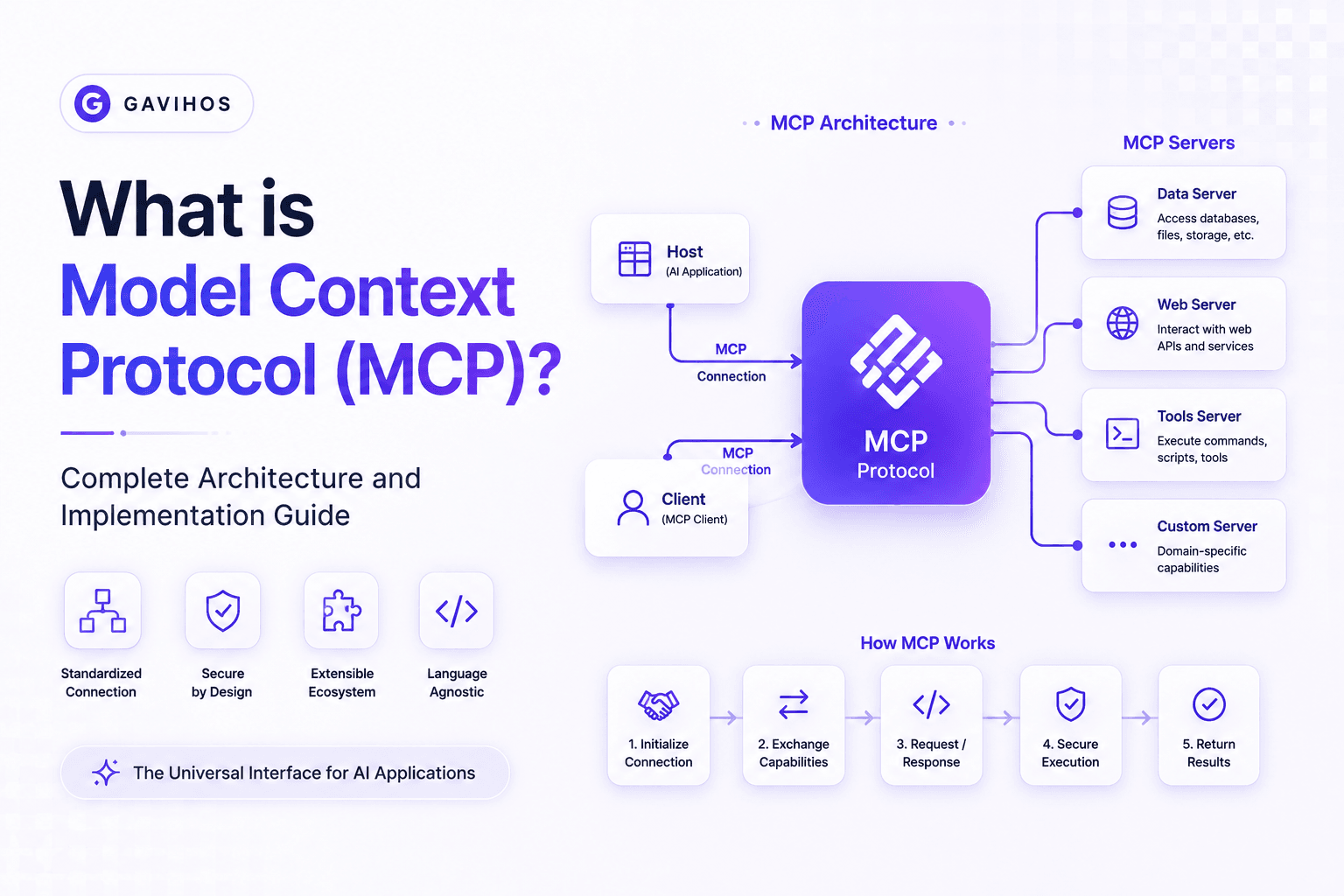
MCP uses a client-server architecture with three distinct roles.
The Three Roles
1. MCP Host
The MCP host is the application the user interacts with. Examples include Claude Desktop, Claude Code, Cursor, and any AI-powered application you build yourself.
The host is responsible for connecting to MCP servers and presenting the AI’s results to the user.
2. MCP Client
The MCP client is the component inside the host that manages the protocol connection. When the host needs to communicate with an MCP server, it does so through a client.
Each client maintains a one-to-one connection with a single server.
3. MCP Server
The MCP server is the program that exposes tools, data, and capabilities to the AI. It handles requests from the client and returns results.
An MCP server for a PostgreSQL database would receive a query from the AI, run it against the database, and return the results. The server enforces what the AI is allowed to query.
The Request Flow
Here is how a complete MCP interaction works:
User asks AI a question
  → Host passes the question to the AI model
  → AI model identifies it needs external data
  → AI model sends a request through the MCP Client
  → MCP Client forwards the request to the MCP Server
  → MCP Server retrieves the data or executes the action
  → MCP Server returns the result to the MCP Client
  → MCP Client passes the result to the AI model
  → AI model uses the result to answer the question
  → Host presents the answer to the user
The entire flow happens automatically. The user asks a question. The AI determines what it needs. MCP handles the connection.
Transport Options
MCP supports two transport mechanisms:
stdio (Standard Input/Output) Used for local servers running on the same machine. The host starts the server as a subprocess and communicates through standard input and output streams. This is the simplest setup and works well for development and local tools.
HTTP with Server-Sent Events (SSE) Used for remote servers running on separate machines or cloud infrastructure. The client connects over HTTP, and the server streams responses using SSE. This is the standard for production enterprise deployments.
Architecture: The Three Things MCP Servers Expose
Every MCP server exposes one or more of three primitives. Understanding these three primitives is the foundation of understanding MCP.
1. Tools
Tools are functions the AI can call to take actions.
A tool has a name, a description, and a defined set of input parameters. The AI reads the description to understand what the tool does and decides when to call it.
Examples of tools:
| Tool Name | What It Does |
|---|---|
run_sql_query | Execute a SQL query against a database |
send_email | Send an email through an email service |
create_github_issue | Create an issue in a GitHub repository |
search_web | Perform a web search and return results |
read_file | Read the contents of a file from a filesystem |
call_api | Make an HTTP request to an external API |
Tools give the AI the ability to do things, not just say things. This is what makes agentic AI possible.
2. Resources
Resources are data the AI can read.
A resource is a piece of data exposed by the server — a file, a database record, a document, a configuration. Resources are read-only by design. The AI can access them for context but cannot modify them directly (it would use a tool for that).
Examples of resources:
| Resource | What It Contains |
|---|---|
project://docs/architecture.md | Architecture documentation |
db://customers/record/12345 | A specific customer record |
config://app/settings | Application configuration |
logs://server/errors/today | Today’s server error logs |
Resources allow the AI to read relevant context before taking action. A coding agent might read the architecture documentation before suggesting a change. A customer support agent might read a customer’s history before drafting a response.
3. Prompts
Prompts are pre-built templates that help users interact with servers more effectively.
A prompt is a structured interaction pattern exposed by the server. It tells the AI how to approach a specific task using that server’s capabilities.
An example: a database MCP server might expose a prompt called analyze_query_performance. When invoked, it guides the AI through a structured analysis of slow queries — reading query logs, checking indexes, and generating recommendations — rather than leaving the AI to figure out the steps from scratch.
Prompts reduce the effort required to get consistent, high-quality results from complex workflows.
MCP Architecture Summary Table
| Component | Role | Example |
|---|---|---|
| MCP Host | User-facing application | Claude Desktop, Cursor, your app |
| MCP Client | Protocol connection manager | Built into the host |
| MCP Server | Exposes tools, resources, prompts | Database server, file server, API server |
| Tool | Function the AI can execute | run_sql_query, send_email |
| Resource | Data the AI can read | A file, a database record |
| Prompt | Pre-built interaction template | analyze_query_performance |
| Transport (local) | stdio | Local development servers |
| Transport (remote) | HTTP + SSE | Production cloud servers |
Real World Use Cases
1. Software Development
A developer working in Claude Code asks: “Find all the database queries in this codebase that don’t use parameterized inputs.”
Without MCP, Claude cannot access the codebase. With an MCP server for the local filesystem, Claude reads the relevant files, analyzes the queries, and returns a list of vulnerabilities with line numbers.
The same developer can ask Claude to create a GitHub issue for each vulnerability it finds, using a GitHub MCP server to create the issues automatically.
2. Customer Support Automation
A support agent AI needs to resolve a billing dispute. It needs to read the customer’s account history, check recent transactions, look up the payment processor logs, and draft a resolution.
Each of these systems has an MCP server. The AI orchestrates across them in sequence. The support agent receives a complete draft response with all the relevant context already gathered.
The human reviews and approves. The AI did the research. The human makes the decision.
3. Enterprise Data Analysis
A business analyst asks their AI assistant: “Compare Q1 and Q2 revenue by product category and identify the three categories with the largest decline.”
The AI connects to the data warehouse MCP server, runs the appropriate queries, retrieves the results, performs the comparison, and presents a clear summary with the requested analysis.
No SQL expertise required from the analyst. No data exported to a spreadsheet. The AI works directly with the authoritative data source.
4. Development Operations (DevOps)
An on-call engineer receives an alert about elevated error rates. They ask their AI assistant to investigate.
The AI uses the Kubernetes MCP server to check pod status, the logging MCP server to retrieve recent errors, the monitoring MCP server to pull metrics, and the runbook MCP server to find the relevant remediation steps.
It returns a complete incident summary: what is failing, why it is likely failing, and what the runbook recommends.
The engineer makes the call. The AI eliminated 20 minutes of manual investigation.
5. Legal and Compliance Review
A legal team uses an AI assistant to review contracts. The AI connects to a document storage MCP server to read the contract, a compliance database MCP server to check relevant regulations, and a previous contracts MCP server to find comparable clauses.
It flags clauses that differ from the organization’s standard templates and highlights regulatory risk areas.
This does not replace the lawyer. It removes the mechanical work, allowing the lawyer to focus on judgment.
6. Content and Knowledge Management
A technical writer asks their AI to update documentation after a new API version ships. The AI reads the existing documentation through a docs MCP server, reads the API changelog through a version control MCP server, identifies sections that need updating, and drafts the revisions.
The writer reviews the diffs. The AI handled the research and the first draft.
Benefits of MCP
Standardization. One integration per data source, usable by any MCP-compatible AI. No more rebuilding the same connection for each new tool.
Security and control. MCP servers define exactly what the AI can access. The server enforces boundaries. The AI cannot access data the server does not expose.
Auditability. Because all AI interactions with external systems flow through MCP servers, they can be logged, monitored, and audited. This is critical for enterprise compliance.
Model independence. Because MCP is a standard, you can switch AI models without rebuilding integrations. Your MCP servers work with Claude, GPT, Gemini, or any future model that supports the protocol.
Composability. AI agents can use multiple MCP servers in a single workflow. A complex task can span a database, a file system, an email service, and a code repository — all coordinated through the same protocol.
Ecosystem velocity. With 5,800+ servers already built, most common integrations already exist. You can add MCP capability to an existing AI application by connecting to pre-built servers rather than building from scratch.
Limitations
Latency. Every MCP tool call adds a round trip. Complex workflows that require many sequential tool calls can become slow. Designing efficient workflows means minimizing unnecessary calls and batching where possible.
Server reliability. If an MCP server goes down, the AI loses that capability. Production deployments require the same reliability engineering as any other service dependency — monitoring, failover, and error handling.
Context window consumption. Results returned by MCP servers consume the AI’s context window. Large result sets from databases or files can fill the window and reduce the AI’s ability to reason effectively. Servers should return the minimum necessary data.
Security surface. Every MCP server is a potential attack surface. Servers that execute code or interact with sensitive systems require careful security review. The protocol does not automatically protect against a poorly secured server.
Versioning complexity. As MCP servers evolve, managing schema changes and backwards compatibility requires discipline. A tool whose parameters change can break AI workflows that depend on the previous signature.
Emerging enterprise standards. OAuth 2.1 integration and enterprise identity provider support are on the 2026 roadmap but not yet universally implemented. Enterprises with strict identity requirements should evaluate current server implementations carefully.
Best Practices
Design tools with narrow scope. A tool that does one thing clearly is easier for the AI to use correctly than a tool that does many things depending on parameters. Prefer get_customer_by_id over get_customer with optional parameters.
Write clear tool descriptions. The AI decides which tool to call based on the description. Vague descriptions lead to incorrect tool selection. Describe not just what the tool does, but when it should be used and what it returns.
Return structured data. Tools that return JSON with consistent schemas give the AI reliable data to work with. Unstructured text responses require the AI to parse them, which introduces errors.
Implement input validation on every server. Never trust that the AI will always send well-formed requests. Validate inputs server-side. Reject requests that fail validation with clear error messages the AI can understand and report.
Log all tool calls. Every invocation of an MCP tool should be logged with the timestamp, the parameters, the result, and the identity of the requesting client. This is essential for debugging and compliance.
Test tools independently of the AI. Write tests that call your MCP server tools directly, without an AI in the loop. Verify that the tools behave correctly across edge cases before connecting them to a live AI.
Rate limit and throttle. AI models can call tools rapidly in agentic workflows. Without rate limiting, a single misbehaving workflow can exhaust API quotas or overload downstream systems.
Common Mistakes
Exposing too much data through resources. Resources should expose only what the AI needs for the task at hand, not entire databases or unfiltered file systems. Over-permissive resources create security risks and consume context window unnecessarily.
Writing tool descriptions for humans instead of AI. Developers often write descriptions they would find clear. AI models interpret descriptions differently. Test your descriptions by observing whether the AI selects the right tool in ambiguous situations.
Ignoring error states. Developers test the happy path. AI agents encounter the unhappy path constantly. Design your tools to return meaningful errors that the AI can reason about — not silent failures or generic 500 errors.
Building monolithic servers. Combining unrelated capabilities into a single MCP server creates maintenance problems and inflates the tool list the AI must parse. Group tools by domain: one server for database operations, one for file operations, one for external APIs.
Skipping authentication on remote servers. Local stdio servers running on a developer’s machine are low risk. Remote HTTP servers exposed to a network need authentication. Never deploy a remote MCP server without access controls.
Not versioning the protocol schema. As your MCP server evolves, document changes to tool signatures. Clients — including AI applications — may depend on the previous schema. Breaking changes without versioning break downstream applications silently.
Future Outlook
MCP is entering its enterprise maturity phase.
OAuth 2.1 and enterprise identity integration is the most significant near-term development. Enterprises need AI tools to authenticate using their existing identity providers — Okta, Azure AD, Google Workspace. Standardized OAuth 2.1 support will remove the last major barrier to enterprise MCP deployments at scale.
Agent-to-agent tool calling is equally important. Current MCP connects AI models to tools. The next step is AI agents using MCP to communicate with other AI agents — not just calling tools, but delegating subtasks. This is how complex multi-agent workflows will be coordinated without bespoke orchestration code.
The MCP registry is a curated, verified directory of MCP servers with security ratings. Today, finding and evaluating MCP servers requires manual research. The registry will do for MCP what package registries did for open-source software — reduce friction and surface trusted implementations.
Broader AI model support. With every major vendor now supporting MCP, the de facto standardization is complete. Future AI model releases will include MCP support as a baseline feature, not an add-on.
AI infrastructure regulation. As governments treat AI compute as national infrastructure, MCP’s role as the connective standard will come under regulatory scrutiny. Expect future compliance frameworks to reference MCP or MCP-equivalent standards as part of AI system auditability requirements.
Frequently Asked Questions
What does MCP stand for? MCP stands for Model Context Protocol. It is an open standard for connecting AI models to external tools, data sources, and services.
Who created MCP? MCP was created by Anthropic and released as an open standard in November 2024. It has since been adopted by OpenAI, Google, Microsoft, AWS, and thousands of third-party developers.
Is MCP only for Claude? No. MCP is an open standard. Any AI model or application can implement it. As of mid-2026, it is supported by every major AI vendor.
What is the difference between MCP and a regular API? A regular API is designed for software-to-software communication. MCP is designed specifically for AI-to-tool communication. It structures capabilities in a way that AI models can discover, understand, and use without custom integration code.
What is an MCP server? An MCP server is a program that exposes tools, resources, and prompts to an AI through the MCP protocol. It is the component that holds the integration logic with external systems.
Do I need to build my own MCP server? Not necessarily. The MCP ecosystem includes 5,800+ pre-built servers for common integrations — databases, file systems, GitHub, Slack, email, and more. You only need to build a custom server when your system is not already covered.
Is MCP secure? MCP is a protocol, not a security system. Security depends on how individual servers are implemented. Servers with proper authentication, input validation, and access controls are secure. Poorly implemented servers are not. Always evaluate server security before connecting to sensitive systems.
Can MCP be used for multi-agent systems? Yes. MCP is a foundational component of multi-agent architectures. The 2026 roadmap includes formal agent-to-agent tool calling support, which will make coordinating AI agents through MCP the standard pattern.
What is the difference between MCP and function calling? Function calling is a model-level capability that lets an AI call pre-defined functions in a single interaction. MCP is an architecture-level standard that defines how entire systems expose capabilities to AI, with discovery, transport, and server lifecycle management included.
How do I get started with MCP? The official MCP SDK is available for Python and TypeScript. Start by building a simple local server using stdio transport, expose one tool, and connect it to Claude Desktop or another MCP-compatible host. The official documentation at modelcontextprotocol.io is the authoritative starting point.
Key Takeaways
- MCP is an open standard that connects AI models to external tools, data, and services through a defined protocol — not a proprietary integration.
- The architecture has three roles: host (user-facing application), client (protocol manager), and server (integration logic).
- MCP servers expose three primitives: tools (actions), resources (data), and prompts (interaction templates).
- Every major AI vendor has adopted MCP, making it the de facto standard for AI-to-tool connectivity.
- The primary benefits are standardization, security, auditability, and model independence — not just convenience.
- Limitations include latency from round trips, context window consumption, and security responsibilities on server implementers.
- The 2026 roadmap adds enterprise OAuth 2.1 auth, agent-to-agent tool calling, and a curated MCP registry — each of which will expand enterprise adoption significantly.
- If you are building AI applications today, MCP knowledge is not optional. It is foundational.
Stay Updated
Follow GAVIHOS for practical AI, technology and developer-focused insights. No hype. No noise. Just clear explanations of the technologies that matter.